
Essential Maintenance Metrics Every Planner Needs to Know
Get Free Guide
Equipment Maintenance Workflow: A Complete Guide to Building, Optimizing & Automating Your Process
Key Takeaways
- A maintenance workflow is the structured sequence of steps, from work identification through completion and reporting, that keeps maintenance work moving consistently instead of getting lost along the way.
- Workflow failures are costly: average industrial downtime costs approximately $250,000 per hour, and nearly 70% of companies lack full awareness of which assets need maintenance.
- The 7 stages of a standard maintenance workflow are: work identification, prioritization, planning, scheduling, execution, completion/documentation, and reporting/analysis.
- World-class maintenance organizations target a Planned Maintenance Percentage above 80% and keep unscheduled downtime below 10%.
- CMMS software automates the handoffs between stages, which is where most failures happen, through work order routing, reminders, parts tracking, and real-time reporting.
An equipment maintenance workflow is a structured, repeatable sequence of steps that a maintenance organization follows to identify, plan, execute, and close out maintenance tasks. It covers everything from the initial trigger (a work request, alarm, or scheduled PM) through task completion, documentation, and performance reporting. A well-defined workflow ensures consistent execution, clear accountability at each stage, and the data needed for continuous improvement.
Table of Contents
- Why Maintenance Workflows Matter
- The 7 Stages of a Standard Maintenance Workflow
- Maintenance Workflow vs. Maintenance Procedure: What’s the Difference?
- Common Maintenance Workflow Failures and Their Costs
- The Work Order Lifecycle: From Request to Closure
- How to Optimize Your Maintenance Workflow
- Moving from Reactive to Proactive Maintenance
- How CMMS Software Automates and Strengthens the Workflow
- Maintenance Workflow KPIs to Track
- Frequently Asked Questions
Why Maintenance Workflows Matter
Every maintenance department has a workflow. The question is whether it was designed on purpose or just evolved by accident. In organizations without a defined workflow, maintenance tends to be reactive: someone notices a problem, tells the nearest technician, the technician fixes it (or tries to), and nobody records what happened. This approach creates a long list of problems: repeated failures that nobody investigates, spare parts that aren’t available when needed, maintenance backlogs that quietly grow, and management that has no visibility into what the maintenance team actually does all day.
The financial impact is substantial. Industry research from Vanson Bourne estimates that average industrial downtime costs approximately $250,000 per hour. Meanwhile, roughly 70% of companies lack full awareness of which assets require maintenance, which leads to unexpected failures and expensive emergency repairs. In most industries, the total cost of maintenance represents between 10–25% of total operating cost, according to McKinsey & Company. With numbers this large, even small workflow improvements translate into significant savings.
A structured maintenance workflow fixes these issues by creating a repeatable process with clear handoffs, defined responsibilities, and built-in checkpoints. When every task follows the same path, from identification through completion and analysis, the organization gets consistency, accountability, and the data it needs to improve.
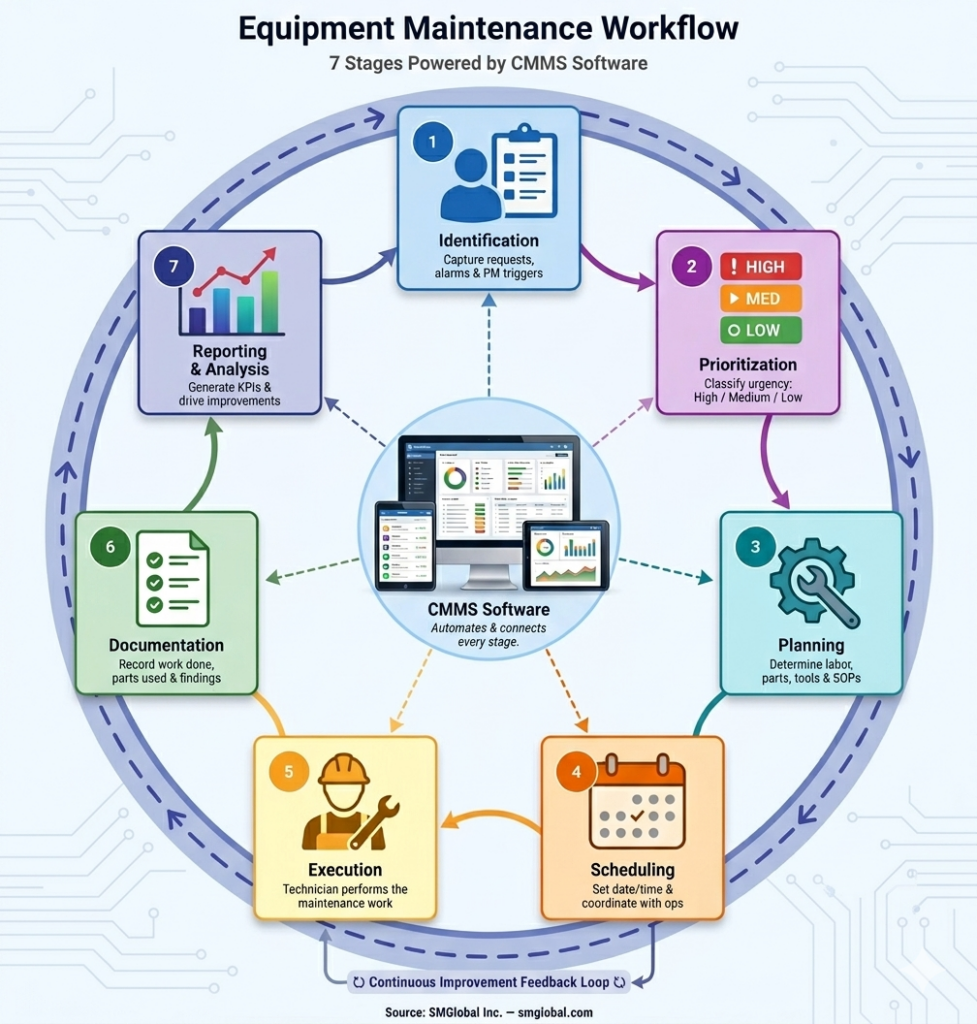
The 7 Stages of a Standard Maintenance Workflow
Every organization customizes its workflow to fit its operation, but most effective ones follow the same seven stages. Understanding each stage, and what tends to go wrong at it, is how you build a process that holds up.
1 Work Identification
Every maintenance task begins with a trigger. Work identification is the stage where a maintenance need is recognized and formally entered into the system. Triggers can come from several sources: an equipment operator submits a work request reporting a problem, an alarm or sensor flags an abnormal condition, a scheduled preventive maintenance task comes due, or an inspection reveals something that needs attention.
The critical requirement at this stage is capture: every maintenance need has to be recorded in a single system (ideally your CMMS) so nothing gets lost. When work requests come in by phone call, hallway conversation, sticky note, or three different email accounts, things slip. It’s one of the most common and most costly workflow failures.
2 Prioritization
Not all maintenance work is equally urgent. Prioritization makes sure critical tasks (the ones affecting safety, production, or compliance) get handled before routine or deferrable work. A common framework uses three levels:
High priority: Safety hazards, production-stopping failures, regulatory-mandated work. Must be completed immediately or within a defined short window.
Medium priority: Important work that can be scheduled within days. Equipment is degraded but still functional, or a backup system is available.
Low priority: Routine tasks, cosmetic issues, or improvements that can be deferred if higher-priority work demands attention.
Without clear prioritization, maintenance teams default to “whoever shouts loudest gets served first.” That means critical preventive maintenance often gets pushed aside in favor of whoever is most persistent. Over time, this creates a cycle where skipped PM leads to more breakdowns, which creates more emergency work, which pushes out more PM. See our tips on breakdown maintenance planning for strategies to manage this cycle.
3 Planning
Planning determines what is needed to complete the work. This includes identifying the required labor (how many technicians, what skill sets), spare parts and supplies, special tools or equipment, safety procedures and permits, and reference documentation (equipment manuals, technical drawings, standard operating procedures).
Good planning dramatically reduces execution time. A well-planned work order means the technician arrives at the job with everything they need, rather than making multiple trips to the storeroom or waiting days for a part to arrive. Industry data consistently shows that proper planning can improve wrench time (the proportion of a technician’s day spent actually working on equipment) from a typical 25–35% to 55% or higher.
4 Scheduling
Scheduling determines when the work will happen. Good scheduling balances several competing factors: equipment availability (can the asset be taken offline?), technician availability, parts availability, production schedules, and the priority of the work relative to other pending tasks.
For preventive maintenance, scheduling should be done well in advance, ideally weeks or months ahead using your equipment maintenance schedule. For corrective work, scheduling depends on priority: emergency work gets immediate scheduling, while lower-priority tasks can be slotted into the next available maintenance window.
The scheduling stage is where coordination with other departments becomes critical. Operations needs to know when equipment will be offline. If maintenance and operations don’t communicate schedules, you end up with either constant conflict (“you can’t take that machine down right now!”) or maintenance that never gets done because there’s never a “good time.” A shared maintenance calendar, available in most CMMS systems, takes out much of this friction.
5 Execution
Execution is where the technician performs the actual maintenance task. In a well-run workflow, the technician receives a work order (via CMMS, email, or mobile app) that includes all the information from the planning stage: the task description, step-by-step procedures, parts already kitted and ready, safety requirements, and any special instructions.
During execution, the technician should record what they find and do, ideally in real time rather than after the fact. That means actual time spent, parts consumed, observations about equipment condition, and any additional work needed. Mobile-enabled CMMS software makes this practical by allowing technicians to update work orders from the field.
6 Completion and Documentation
Once the work is done, the technician reports what was accomplished: the nature of the problem found, the diagnosis, the actions taken, parts replaced, time spent, and any recommendations for follow-up work. This documentation is what makes a data-driven maintenance program possible.
Without complete work order records, you can’t calculate meaningful metrics, identify recurring failure patterns, evaluate technician productivity, or justify budget requests to management. The most common failure at this stage is incomplete documentation — technicians understandably want to move on to the next job rather than fill out paperwork. CMMS software with mobile access and simple completion forms reduces this friction significantly.
7 Reporting and Analysis
The final stage closes the loop. Data from completed work orders feeds into reports that reveal how the maintenance program is performing: Which equipment fails most often? How long do repairs take? What percentage of work is planned versus reactive? How much is maintenance costing per asset? Are we meeting our PM schedule compliance targets?
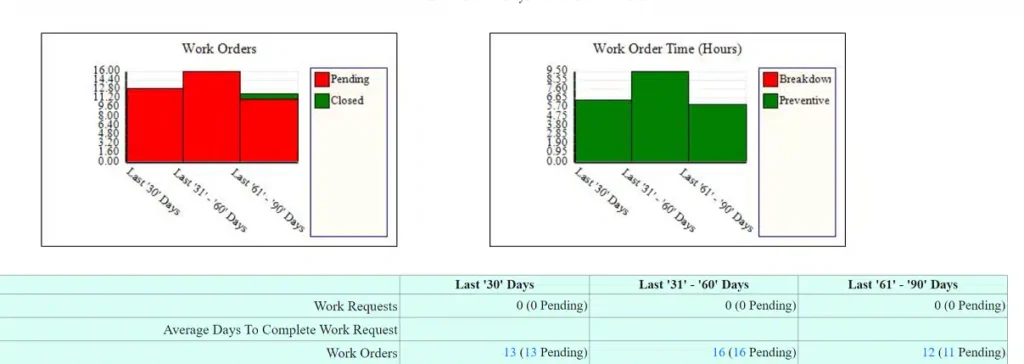
This analysis drives continuous improvement. If a particular machine keeps failing every 6 weeks, that’s a signal to investigate root causes. If work order completion times are increasing, that may indicate planning problems or parts shortages. If reactive maintenance is consuming 60% of your team’s time, you need to invest more heavily in preventive and predictive strategies.
Without this stage, your workflow is a treadmill: the team does the work, but the organization never gets better at it. See 3 Quick Maintenance Metrics for Maintenance Planners for where to start.
Maintenance Workflow vs. Maintenance Procedure: What’s the Difference?
These two terms are often confused, but they refer to different things.
A maintenance workflow is the organizational process: how work moves through your maintenance department from identification to closure. It answers questions like “Who approves work requests?” and “How do technicians receive their assignments?” and “What happens after a work order is completed?”
A maintenance procedure (or Standard Operating Procedure / SOP) is the technical content: the step-by-step instructions for performing a specific task on a specific piece of equipment. It answers questions like “What’s the torque specification for this bolt?” and “In what order should these filters be replaced?” and “What safety lockout steps are required before opening this panel?”
Both are essential. A perfect workflow with poor procedures means work gets assigned and tracked efficiently, but done incorrectly. Perfect procedures with a broken workflow means you have great instructions that nobody follows because work orders never reach the right person at the right time. The workflow governs the process flow; the procedure governs the task content within that flow.
Common Maintenance Workflow Failures and Their Costs
Each stage of the workflow has characteristic failure modes. Understanding these helps you identify where your own process is breaking down.
Failure 1: Lost or Untracked Work Requests
When maintenance requests arrive through informal channels (phone calls, hallway conversations, sticky notes), they inevitably get lost. A request that isn’t captured in the system doesn’t get a work order, doesn’t get scheduled, and doesn’t get done. The result: equipment problems that could have been addressed with a simple repair escalate into full breakdowns.
In facilities that receive dozens of requests daily, even a 5% “lost request” rate means multiple issues per week going unaddressed. Over months, this compounds into equipment degradation, frustrated operators, and cascading failures.
Fix: Route all requests through a single channel, ideally a CMMS work request form accessible via web or mobile. Every request gets logged, timestamped, and assigned, eliminating the possibility of silent failure.
Failure 2: Preventive Maintenance Not Being Scheduled
This is one of the most damaging workflow failures because it’s invisible until something breaks. When preventive maintenance work isn’t being scheduled, or gets routinely skipped because reactive work takes priority, you’re slowly converting planned maintenance into unplanned breakdowns. Each skipped PM task is a future emergency repair in the making.
Fix: Use your CMMS to auto-generate PM work orders based on time intervals, meter readings, or condition triggers. When PM work orders are generated automatically, they can’t be “forgotten.” They show up in the queue and have to be actively addressed: completed, rescheduled, or formally deferred with a documented reason.
Failure 3: Work Orders Not Reaching the Right Technician
A work order that sits in a queue or goes to the wrong person is effectively the same as no work order at all. This happens when assignment is manual and dependent on a single supervisor, or when there’s no system for matching task requirements (skill sets, certifications) to available technicians.
Fix: CMMS-based auto-routing based on skill set, location, and availability. Delivery via email and/or mobile push notification with read receipts ensures the assigned technician actually sees the assignment.
Failure 4: Missing Spare Parts at Time of Repair
A technician arrives at a job site, diagnoses the problem, and then discovers the needed part isn’t in stock. The job stalls: the work order goes incomplete, the equipment stays down, and an emergency purchase order gets filed at premium cost. This is both a workflow failure (parts weren’t linked to the planned task) and an inventory management failure.
Fix: Associate required parts with work order templates and PM tasks in your CMMS. Verify parts availability during the planning stage, before the work order is scheduled. Set reorder alerts to maintain stock of frequently used items.
Failure 5: Incomplete Documentation After Work
When technicians don’t record what they did, or record only minimal information, the organization loses the data it needs to improve. You can’t track failure patterns, evaluate parts quality, calculate accurate MTTR, or identify training needs without complete work order records.
Fix: Simplify documentation with mobile CMMS tools that let technicians log completion details, upload photos, and record parts usage from a phone or tablet. Use required fields to ensure key data points are captured before a work order can be closed.
Failure 6: Poor Reporting to Management
Management needs clear, timely reports on maintenance performance to make informed budget, staffing, and equipment decisions. When reporting is manual, compiled from spreadsheets, paper records, or memory, it’s slow, inaccurate, and often unconvincing. The maintenance department ends up unable to justify its budget or demonstrate its value.
Fix: Use CMMS-generated reports that pull directly from work order data. Standard reports should cover work order completion rates, equipment downtime, cost breakdowns, PM compliance, and backlog trends. When management can see real data, conversations about maintenance budget shift from opinion-based to evidence-based. See equipment maintenance software reports for real costs for more.
The Work Order Lifecycle: From Request to Closure
The work order is the central document of any maintenance workflow. Understanding its lifecycle helps clarify what should happen at each stage and where things can stall.
A typical work order moves through these statuses:
Requested → Someone submits a maintenance need. The work order exists but hasn’t been reviewed yet.
Approved → A supervisor or planner reviews and authorizes the work. Non-valid requests are rejected with an explanation.
Planned → Required labor, parts, tools, and procedures have been identified and attached to the work order.
Scheduled → A specific date and time window has been assigned. The technician and operations are both aware.
In Progress → The technician has started work. Parts have been drawn from inventory.
Completed → Work is finished. The technician has documented what was done, time spent, and parts used.
Closed → A supervisor reviews the completed work order, verifies the information, and closes it. The data flows into reporting.
In CMMS software, each transition creates a timestamp and an audit trail. If a work order has been sitting in “Approved” status for two weeks, that’s visible, and you can act on it. Without this tracking, stalled work orders are invisible until someone complains.
How to Optimize Your Maintenance Workflow
If you already have a basic workflow in place but want to improve it, these optimization strategies address the most common sources of inefficiency.
Map Your Current Process Before Changing It
Before you can improve a workflow, you need to document what actually happens today — not what’s written in a manual, but what people actually do. Walk through recent work orders from start to finish and note every handoff, delay, and workaround. Where do requests enter the system? How are they prioritized? Who decides what gets scheduled? How do technicians receive assignments? What happens when a part isn’t available? This exercise almost always reveals steps that the organization didn’t realize existed and bottlenecks that are obvious once made visible.
Eliminate Paper-Based Handoffs
Every time information moves from a digital system to paper (or vice versa), there’s an opportunity for loss, delay, and error. Printed work orders that sit in a technician’s truck for days before being returned. Handwritten completion notes that nobody can read. Verbal status updates that the supervisor forgets to enter into the system. Each of these is a workflow vulnerability. Moving to a fully digital process, with technicians receiving and completing work orders on mobile devices, closes these gaps.
Standardize Work Order Templates
Creating templates for your most common maintenance tasks ensures that every work order of a given type includes the same steps, the same parts list, the same safety requirements, and the same estimated time. This reduces planning effort for recurring work and ensures consistency regardless of which planner creates the order or which technician executes it.
Batch and Group Related Work
If three pieces of equipment in the same area each need PM this week, schedule them together rather than as three separate trips. If a corrective repair on a machine creates an opportunity to do the upcoming PM at the same time, combine them. Grouping related tasks reduces travel time, equipment shutdowns, and scheduling overhead.
Review and Refine Continuously
A maintenance workflow isn’t a “set it and forget it” system. Conduct a brief workflow review monthly or quarterly: What work orders took longest to complete, and why? Where did parts shortages cause delays? Were any PM tasks skipped, and what was the consequence? What feedback are technicians providing about process friction? Use this information to make incremental adjustments. For a more thorough review, see our guide to running a 5-step maintenance management program audit.
Moving from Reactive to Proactive Maintenance
The most important transformation a maintenance workflow can support is the shift from reactive to proactive maintenance. In a reactive organization, most work is unplanned: equipment breaks, someone scrambles to fix it, and the cycle repeats. In a proactive organization, most work is planned: failures are anticipated, maintenance is scheduled in advance, and breakdowns are the exception rather than the rule.
This shift is measurable through the Planned Maintenance Percentage (PMP):
World-class maintenance organizations target a PMP of 80% or higher. If your PMP is below 50%, you’re spending more than half your maintenance effort on firefighting. That’s more expensive per task, harder on technicians, worse for equipment longevity, and harder to manage.
The roadmap for making this transition typically follows these steps:
Step 1: Implement a CMMS to start capturing work order data systematically. You can’t measure your current state without a system of record.
Step 2: Build an equipment maintenance schedule based on manufacturer recommendations, equipment age, and operating conditions.
Step 3: Auto-generate PM work orders from the schedule. This is the single most impactful CMMS feature for increasing PMP.
Step 4: Track PM compliance (percentage of scheduled PM tasks actually completed on time) and hold the organization accountable.
Step 5: Analyze work order data to identify recurring failures and invest in root cause elimination.
Step 6: For high-criticality assets, consider condition-based or predictive maintenance using sensor data and monitoring. This further reduces unplanned work by catching degradation before failure.
The transition typically takes 6–18 months depending on organizational maturity, but the ROI is substantial. An optimized maintenance strategy can reduce downtime by more than 30% and proactive facilities implementing these measures have reported up to 18% lower maintenance costs compared to reactive approaches.
How CMMS Software Automates and Strengthens the Workflow
Most maintenance workflow failures happen at handoffs, the points where information or responsibility passes from one person or stage to the next. A request that’s received but never entered into the system. A work order that’s created but never assigned. A completed job that’s never documented. CMMS (Computerized Maintenance Management System) software directly addresses these failure points by automating transitions and creating accountability.
Here’s how CMMS features map to each workflow stage:
Work identification: A CMMS provides a centralized portal for submitting and tracking work requests. All requests enter one system, with timestamps and status tracking, so nothing gets lost. In FastMaint CMMS, external users and equipment operators can submit requests that automatically create trackable entries.
Prioritization: Work orders can be classified by priority level, and the CMMS can sort and filter the queue so planners see high-priority items first.
Planning: Work order templates pre-populate with task steps, required parts (linked to inventory records), estimated time, and safety procedures. The planner verifies parts availability before scheduling.
Scheduling: The CMMS auto-generates PM work orders based on defined frequencies (time-based, meter-based, or condition-based). For corrective work, the planner schedules from the queue. See how to schedule preventive maintenance work orders in FastMaint.
Execution: Work orders reach technicians via email, text message, or mobile app. The technician sees all job details in one place and can update status in real time.
Completion: Technicians record time, parts used, and observations directly in the CMMS. Overdue work orders trigger automated reminders. Required fields ensure essential data is captured.
Reporting: The CMMS generates standard reports on work order completion rates, equipment downtime, maintenance costs, PM compliance, backlog levels, and more. These reports can be run for any time period and compared against previous periods to show trends. See our guide to equipment maintenance software reports.
Maintenance Workflow KPIs to Track
Once your workflow is digital and generating data, these KPIs will tell you how well it’s performing and where to focus improvement efforts. Track 3–5 at a time for clarity and focus.
Work Order Completion Rate: The percentage of work orders completed on time. A declining rate signals scheduling problems, resource shortages, or scope issues. Track this weekly or monthly.
Mean Time to Repair (MTTR): The average time from when a failure is reported to when the equipment is restored to service. A high MTTR points to planning, parts, or skill problems. Aim for consistent reduction over time.
Mean Time Between Failures (MTBF): The average operating time between breakdowns for a given asset. Rising MTBF indicates improving reliability. This is a lagging indicator — changes in PM compliance today show up in MTBF months later.
Planned Maintenance Percentage (PMP): The ratio of planned to total maintenance hours. World-class target: 80%+. Below 50% indicates a predominantly reactive operation.
PM Compliance: The percentage of scheduled preventive maintenance tasks completed on time. This is a leading indicator — high PM compliance today predicts fewer breakdowns in the future.
Equipment Downtime: Total time equipment is unavailable due to maintenance or failure. World-class unscheduled downtime is below 10%, with asset availability above 90%.
Maintenance Backlog: The total hours of pending maintenance work. A healthy backlog is typically 2–4 weeks of work. A growing backlog signals that demand exceeds capacity: either resources need to increase or the workload needs to come down through better PM.
First-Time Fix Rate: The percentage of repairs completed successfully on the first visit. A low rate indicates planning problems (wrong parts, insufficient information) or skill gaps.
Your CMMS should make most of these KPIs available through standard dashboards and reports. Review monthly, and drive decisions off trends rather than single data points. For more, see 3 Quick Maintenance Metrics for Maintenance Planners and 6 Signs Your Maintenance Plan Needs to Change.
Ready to Build a Better Maintenance Workflow?
FastMaint CMMS includes automated PM scheduling, work order management, mobile access for technicians, spare parts tracking, and built-in reporting. That’s what you need to move from reactive to proactive maintenance.
Frequently Asked Questions About Maintenance Workflows
What is an equipment maintenance workflow?
An equipment maintenance workflow is a structured, repeatable sequence of steps that a maintenance organization follows to identify, plan, execute, and close out maintenance tasks. It typically includes work identification (requests and alarms), prioritization, planning and scheduling, work order creation and assignment, task execution, completion and documentation, and reporting and analysis.
What are the main stages of a maintenance workflow?
A standard maintenance workflow has seven stages: (1) Work Identification, from requests, alarms, or scheduled PM triggers; (2) Prioritization, classifying urgency and impact; (3) Planning, determining labor, parts, tools, and procedures; (4) Scheduling, assigning a time window that minimizes production disruption; (5) Execution, where the technician performs the work; (6) Completion and Documentation, recording what was done, parts used, and observations; (7) Reporting and Analysis, generating metrics to drive continuous improvement.
Why is a maintenance workflow important?
A defined maintenance workflow reduces unplanned downtime, prevents work requests from being lost or forgotten, ensures the right technician with the right parts shows up at the right time, and creates a data trail for continuous improvement. Research suggests average industrial downtime costs approximately $250,000 per hour, making workflow failures extremely expensive.
What is the difference between a maintenance workflow and a maintenance procedure?
A maintenance workflow is the high-level organizational process: how work gets identified, approved, planned, assigned, executed, and closed. A maintenance procedure is the detailed step-by-step technical instructions for performing a specific task on a specific piece of equipment. The workflow governs the process flow; the procedure governs the task content within that flow.
How does CMMS software improve a maintenance workflow?
CMMS software automates work order creation from PM schedules and requests, routes assignments to the right technicians, tracks work order status in real time, sends reminders for overdue tasks, manages spare parts inventory, and generates performance reports. This eliminates the manual handoffs where most workflow failures occur. Learn about FastMaint CMMS features.
What KPIs should I track to measure maintenance workflow performance?
Key KPIs include: Work Order Completion Rate, Mean Time to Repair (MTTR), Mean Time Between Failures (MTBF), Planned Maintenance Percentage (world-class target: 80%+), Equipment Downtime (world-class unscheduled: below 10%), Maintenance Backlog (target: 2–4 weeks), and First-Time Fix Rate. Track 3–5 KPIs at a time and review monthly.
What is Planned Maintenance Percentage and why does it matter?
Planned Maintenance Percentage (PMP) measures the ratio of planned maintenance hours to total maintenance hours. Formula: PMP = (Planned Maintenance Hours / Total Maintenance Hours) × 100. A high PMP indicates proactive maintenance. World-class organizations target 80%+. A low PMP means most work is reactive, which is more expensive and less efficient.
How do I move from reactive to proactive maintenance?
The transition requires: (1) Implementing a CMMS to track work orders systematically; (2) Building PM schedules from manufacturer recommendations and failure data; (3) Auto-generating PM work orders; (4) Tracking PM compliance; (5) Analyzing work order data for recurring failures; (6) Adding condition-based monitoring for critical assets. The transition typically takes 6–18 months.
What are the most common maintenance workflow failures?
The most common failures include: lost or untracked work requests, PM not being scheduled or routinely skipped, work orders not reaching the right technician, missing spare parts at time of repair, incomplete documentation after work, and poor reporting to management. A CMMS addresses most of these by automating handoffs and creating accountability.
What is a maintenance work order lifecycle?
The work order lifecycle follows these statuses: Requested → Approved → Planned → Scheduled → In Progress → Completed → Closed. Each transition should create a timestamp and audit trail in your CMMS. Tracking work orders through these stages ensures nothing stalls or gets lost.
Related Reading
- How to Schedule Preventive Maintenance Work Orders
- 7 Tips to Plan Equipment Preventive Maintenance
- Easy Ways to Create an Equipment Maintenance Schedule
- Maintenance Spare Parts Management: 10 Proven Strategies
- How to Manage Maintenance Backlog for Equipment
- 5 Tips for Maintenance Work Order Estimates
- 7 Breakdown Maintenance Planning Tips
- 3 Quick Maintenance Metrics for Maintenance Planners
- Equipment Maintenance Software Reports for Real Costs
- Easy 5-Step Maintenance Management Program Audit
- Six Signs Your Maintenance Plan Needs to Change
- Machine Maintenance: How to Keep Your Machinery Healthy
- Maintenance Management: Sources of Failure
- FastMaint CMMS Case Studies
Note: Industry benchmarks cited in this article (downtime costs, PMP targets, downtime percentages, maintenance cost ratios) are drawn from widely published maintenance industry research including data from Vanson Bourne, McKinsey, Plant Engineering, and SMRP (Society for Maintenance & Reliability Professionals). Actual figures vary by industry, facility size, and equipment profile. Refer to standards such as ISO 55001 for asset management frameworks applicable to your operation.
Essential Maintenance Metrics Every Planner Needs to Know
Get Free Guide
