
Essential Maintenance Metrics Every Planner Needs to Know
Get Free Guide
CMMS Software Costs & Benefits: A Complete Guide to Budgeting, ROI & Total Cost of Ownership
Key Takeaways
- CMMS software costs go far beyond the license or subscription fee. Total cost of ownership (TCO), including implementation, training, data migration, and ongoing support, can add 50–150% on top of the advertised price.
- Cloud-based CMMS typically costs $29–$79 per user/month for standard plans. On-premises CMMS has a higher upfront cost but can be more economical long-term for larger teams.
- Quality CMMS implementations deliver 300–500% ROI within 3 years through reduced downtime, lower maintenance costs, and extended asset life.
- Even a conservative 20% efficiency gain on a $400,000/year maintenance budget saves $80,000 annually, far more than the cost of most CMMS solutions.
- The 9 measurable benefits of CMMS include fewer breakdowns, lower overtime, better inventory management, standardized procedures, and improved management reporting.
CMMS (Computerized Maintenance Management System) software is a platform that helps maintenance teams plan, track, and manage all maintenance activities, from preventive maintenance scheduling and work order management to spare parts inventory and equipment history tracking. It replaces paper-based and spreadsheet processes with a centralized digital system, enabling data-driven maintenance decisions and measurable performance improvements.
Table of Contents
- Why You Need to Budget for CMMS Properly
- CMMS Pricing Models: Cloud vs. On-Premises
- The 8 Cost Categories of CMMS Software
- Hidden Costs to Watch For
- 9 Measurable Benefits of CMMS Software
- How to Calculate CMMS ROI
- Building the Business Case for Management
- Implementation Timeline and What to Expect
- Frequently Asked Questions
Why You Need to Budget for CMMS Properly
When buying CMMS software, most organizations focus on the subscription or license price and miss the full picture. The sticker price is just the starting point. The real investment includes implementation, training, data migration, ongoing support, and the time your team spends learning and using the system. Underestimating these costs leads to budget surprises that can derail an otherwise valuable project.
Equally important is understanding the benefits side of the equation. CMMS software isn’t a cost center. It’s an investment that generates measurable returns. But you need to quantify those returns to justify the purchase to management, set realistic expectations, and choose the right product for your budget and needs.
The global CMMS market is valued at over $1.46 billion and is growing at roughly 11% per year, driven by organizations recognizing that structured maintenance management delivers real financial returns. Nearly 60% of facilities have already deployed a CMMS, with adoption accelerating as digital transformation becomes the standard rather than the exception.
This guide covers both sides, every cost you should plan for and every benefit you can expect, so you can make an informed decision and build a solid case for your organization.
CMMS Pricing Models: Cloud vs. On-Premises
Before diving into specific cost categories, it’s important to understand the two fundamental pricing models, as they affect your upfront investment, ongoing expenses, and total cost of ownership differently.
Cloud-Based (SaaS) CMMS
With cloud-based CMMS, you pay a recurring subscription fee (monthly or annually) to access software hosted by the vendor. You don’t own the software; you rent access to it. This model has become dominant in recent years because it lowers the barrier to entry and eliminates the need for your own server infrastructure.
Typical cloud CMMS pricing ranges from $29–$79 per user per month for standard plans, with enterprise tiers running $100+ per user per month. Small businesses often spend $100–$500 per month total, while larger organizations with complex needs may invest $10,000–$50,000+ per year. Subscription fees usually include software updates, hosting, and basic support.
The financial structure is operating expenditure (OpEx): predictable recurring costs that are easier to budget and don’t require capital approval in most organizations.
On-Premises CMMS
On-premises CMMS involves purchasing a perpetual software license that you install and run on your own servers. The upfront cost is higher, but there are no recurring subscription fees. Annual support and maintenance agreements (which provide updates, upgrades, and vendor support) typically cost 15–20% of the initial license price per year.
This model is classified as capital expenditure (CapEx). While the initial investment is larger, on-premises CMMS can be significantly more cost-effective over 5+ years for organizations with larger teams, especially when factoring in the cumulative cost of per-user monthly subscriptions. It also offers advantages in data control, security, and independence from internet connectivity. See our comparison of on-premises vs. cloud-based CMMS for a detailed analysis.
The 8 Cost Categories of CMMS Software
Whether you choose cloud or on-premises, these are the cost categories you need to account for in your CMMS budget. Not all will apply to every situation, but understanding each prevents surprises.
1. Software License or Subscription Fees
This is the most visible cost. For on-premises software, it’s a one-time license purchase. For cloud-based software, it’s the recurring monthly or annual subscription. Be aware that many vendors advertise low entry prices but gate essential features (advanced reporting, mobile access, integrations) behind higher-priced tiers. The final monthly cost per user can end up 2–3x higher than the advertised entry price when you factor in the features your team actually needs.
2. Implementation and Configuration
Getting the software set up for your specific operation takes work. This includes configuring the system to match your maintenance workflows, setting up equipment hierarchies, defining user roles and permissions, and customizing forms and templates. Some vendors include basic implementation in the subscription price; others charge separately. Implementation fees can range from included (for simple setups) to $5,000–$100,000+ for complex enterprise deployments.
3. Data Migration
Transferring data from your existing system, whether that’s another CMMS, spreadsheets, or paper records, into the new software is frequently one of the most underestimated costs. It involves cleaning, formatting, and importing equipment lists, maintenance histories, parts inventories, vendor information, and work order templates. Even if your maintenance team does this work internally, there’s a real cost in labor hours spent. Plant Services magazine has documented that converting data to a new CMMS is often harder than expected.
4. Training
CMMS software only delivers value if your team actually uses it. Budget for both the direct cost of training (vendor-provided sessions, whether on-site, virtual, or self-paced) and the indirect cost of your team’s time spent learning the system. Consider training for different user roles: maintenance planners need deeper training than technicians who primarily receive and complete work orders. Don’t forget to budget for ongoing training as new employees join the team.
5. Hardware and Infrastructure (On-Premises)
On-premises deployments require server hardware, database software, operating system licenses, network infrastructure, and backup solutions. Cloud-based deployments eliminate most of these costs, though you may still need mobile devices or tablets for field technicians. If you’re using barcode or QR code scanning for parts management, you’ll need compatible scanners or devices.
6. Ongoing Support and Maintenance Fees
For on-premises software, annual support agreements (typically 15–20% of the license fee) provide access to updates, patches, and vendor technical support. For cloud software, basic support is usually included in the subscription, but premium support tiers with faster response times and dedicated account managers often cost extra.
7. Integration Costs
If you need your CMMS to connect with other business systems (ERP, accounting software, IoT sensors, building management systems), there may be integration development costs. Some CMMS platforms offer pre-built integrations; others require custom API development, which can be a significant expense.
8. System Administration
Someone needs to maintain the CMMS on an ongoing basis: managing user accounts, performing backups (for on-premises systems), generating reports, troubleshooting issues, and ensuring data quality. This is an ongoing labor cost that’s often overlooked in the initial budget but is real and recurring.
Hidden Costs to Watch For
Beyond the eight categories above, these are the costs that most often catch organizations by surprise:
Feature gating: The base plan covers work orders and basic asset tracking, but you need preventive maintenance scheduling, mobile access, or custom reports — each available only in a higher tier. This is the most common source of “sticker shock” with cloud CMMS.
Per-asset pricing: Some vendors charge based on the number of assets tracked rather than (or in addition to) the number of users. For organizations with thousands of assets, this can dramatically increase costs.
Contract lock-in: Annual contracts with auto-renewal and early termination fees can trap you if the software doesn’t meet your needs. Negotiate terms carefully and try to start with a shorter commitment period.
Customization costs: If the out-of-the-box configuration doesn’t fit your workflows, custom development can be expensive. Evaluate how much flexibility the standard product offers before assuming you’ll need customization.
Opportunity cost of slow implementation: Every week a CMMS sits in implementation limbo is a week of continued manual processes, missed PMs, and lost data. A deployment that drags from 4 weeks to 6 months doesn’t just cost more in consulting fees. It delays the ROI you’re investing for.
9 Measurable Benefits of CMMS Software
The costs are real, but so are the returns. Here are the nine primary ways CMMS software delivers measurable value to maintenance operations.
1. Reduced Equipment Breakdowns
With a preventive maintenance program managed through CMMS, you schedule and track PM tasks systematically rather than relying on memory or paper calendars. Tasks don’t get skipped because they’re automatically generated and tracked. The result: fewer unexpected breakdowns over time. Industry data indicates that organizations implementing structured PM programs reduce unplanned downtime by 30% or more. With average industrial downtime costing approximately $250,000 per hour, even a modest reduction in breakdowns translates to significant savings.
2. Lower Overtime Costs
Fewer breakdowns means fewer maintenance emergencies requiring all-hands-on-deck responses. When critical equipment fails unexpectedly, technicians work overtime (often at 1.5x or 2x rates) to restore operations as quickly as possible. A CMMS-driven shift from reactive to planned maintenance reduces these emergency situations. World-class maintenance operations keep overtime below 5% of total maintenance hours. If your overtime currently runs 15–20%, the savings potential is substantial.
3. Improved Maintenance Backlog Management
Maintenance backlog, the accumulation of overdue or pending work, is invisible without a tracking system. CMMS makes it visible and manageable. You can see exactly how many hours of work are pending, which tasks are overdue, and where bottlenecks exist. A healthy backlog is typically 2–4 weeks of work. If yours is growing unchecked, it signals that demand exceeds capacity and corrective action is needed. Learn more in our guide to managing maintenance backlogs.
4. Fewer Schedule Conflicts with Operations
When maintenance and operations don’t coordinate schedules, you end up with conflicts: critical maintenance planned at the same time production needs the equipment, or maintenance that never gets done because there’s never a “good time.” CMMS-generated maintenance calendars make planned maintenance visible to everyone, enabling coordination that avoids costly conflicts and builds better relationships between departments.
5. Extended Asset Lifespan
Equipment that receives regular, proper maintenance lasts significantly longer than equipment that runs until it breaks. CMMS ensures that manufacturer-recommended maintenance schedules are followed, lubrication intervals are met, and early warning signs are documented and acted on. The result is deferred capital expenditure — you replace equipment less frequently, and the replacement cost of major assets (motors, HVAC units, production machinery) runs from thousands to hundreds of thousands of dollars per unit.
6. Improved Spare Parts Inventory Management
CMMS connects parts inventory to equipment and work orders, enabling data-driven spare parts management. You can forecast demand from PM schedules, set automated reorder alerts, track consumption patterns, and identify surplus or obsolete inventory. MRO inventory commonly accounts for 40–50% of the total maintenance budget, and carrying costs run 20–30% of inventory value per year. Even a 10% reduction in inventory carrying costs is a meaningful savings.
7. Better Problem Analysis and Management Reporting
CMMS generates data that enables root cause analysis and performance trending. Which equipment fails most often? What’s the average repair time? What percentage of work is planned vs. reactive? How much does maintenance cost per asset? These insights drive continuous improvement and give management visibility into the maintenance department’s performance. Without CMMS data, management makes budget and staffing decisions based on impressions rather than evidence. With it, conversations shift to facts. See 3 quick maintenance metrics for planners and our guide to equipment maintenance software reports.
8. Standardized Maintenance Procedures
CMMS work order templates standardize how maintenance tasks are performed. Every work order of a given type includes the same steps, safety procedures, parts list, and time estimates. This ensures consistency regardless of which technician does the work, simplifies training for new hires, and reduces errors caused by missing steps or incorrect procedures.
9. Better Customer and User Satisfaction
The cumulative effect of fewer breakdowns, better scheduling, and more reliable equipment is improved satisfaction for everyone who depends on the maintenance department — whether that’s production teams, building occupants, hotel guests, or external customers. Maintenance plans are less likely to interfere with operations, equipment is more reliable, and the department builds a reputation for competence rather than firefighting. See our CMMS benefits and ROI case study for a real-world example with dollar figures.
How to Calculate CMMS ROI
To build a credible business case, you need to move from qualitative benefits (“fewer breakdowns”) to quantifiable projections (“$X saved per year”). Here’s a framework for calculating CMMS ROI.
Step 1: Quantify Your Current Maintenance Costs
Use at least 12 months of historical data to establish a baseline. Include direct costs (labor, parts, contractor fees), indirect costs (overtime, emergency purchases at premium prices), and downtime costs (production lost during unplanned equipment outages). Also factor in the cost of managing maintenance manually — the hours spent on spreadsheets, paper work orders, and searching for information.
Step 2: Estimate Improvement Percentages
Apply conservative improvement estimates to each cost category. A reasonable starting point based on industry benchmarks:
Reduction in unplanned downtime: 20–30%. Reduction in overtime costs: 15–25%. Improvement in maintenance labor productivity: 10–20%. Reduction in inventory carrying costs: 5–10%. Extension of average asset life: 10–20% (translating to deferred capital expenditure).
Step 3: Calculate Annual Savings and ROI
ROI = ((Annual Savings – Annual CMMS Cost) / Annual CMMS Cost) × 100
Payback Period = Total CMMS Investment / Annual Savings
Example Calculation
A facility with 200 assets spending $400,000/year on maintenance applies a conservative 20% overall efficiency gain from CMMS implementation. That produces $80,000 in annual savings. If the CMMS costs $100/user/month for a 10-person team, the annual software cost is $12,000. Even adding $10,000 for implementation and training in year one, the first-year ROI is approximately 360%. The payback period is under 4 months.
These numbers aren’t unusual. CMMS software costs are small relative to maintenance labor and parts. Even a 5% improvement in technician wrench time (the percentage of their day spent actually working on equipment versus searching for information, walking to the tool crib, or waiting for parts) pays for the software many times over.
Building the Business Case for Management
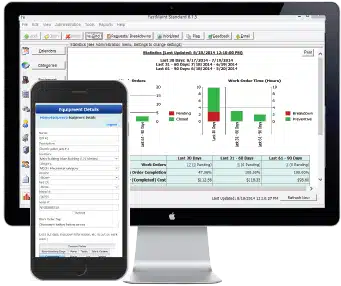
Most maintenance managers know they need CMMS software. The challenge is convincing management to approve the budget. Here’s how to structure the conversation:
Lead with the problem, not the solution. Start with the costs your organization is currently incurring: downtime hours, overtime spending, maintenance backlogs, missed PMs, and the consequences (equipment failures, production delays, safety risks). Use specific numbers from your own operation, not industry averages.
Present the financial comparison. Show the total cost of the CMMS (including all categories above) alongside the projected savings, calculated conservatively. Present this as a timeline showing the break-even point and cumulative savings over 3–5 years.
Address risk. Management will ask “what if it doesn’t work?” Address this by pointing to the trial period (most vendors offer 30-day trials), the phased implementation approach (start with core features, expand over time), and the low risk relative to the potential reward. The cost of doing nothing, continuing with manual processes and reactive maintenance, is itself a risk that increases as equipment ages.
Include non-financial benefits. Some CMMS benefits don’t show up in an ROI spreadsheet but matter to leadership: reduced safety incidents, better regulatory compliance, faster audit responses, improved technician morale, and the ability to demonstrate the maintenance department’s value with data. Mention these alongside the financial case.
Our free CMMS Software Selection Guide provides a structured checklist to help evaluate products and build your business case.
Implementation Timeline and What to Expect
The speed of implementation directly affects your time-to-ROI. Every week spent in setup is a week your organization isn’t benefiting from the investment. Here’s what typical timelines look like:
Small operations (under 50 assets, under 10 users): 2–4 weeks. Import equipment lists, configure basic PM schedules, set up users, and start generating work orders. This is especially fast when moving from spreadsheets or paper rather than migrating from a legacy CMMS.
Mid-market operations (50–500 assets, 10–50 users): 4–8 weeks. Includes more extensive data migration, custom workflow configuration, parts inventory setup, and structured training for different user roles.
Enterprise operations (500+ assets, 50+ users, multiple sites): 3–12+ months. Involves complex integrations with ERP/accounting systems, multi-site rollout, extensive change management, and phased deployment across locations.
The key to fast, successful implementation is starting with the essentials (equipment list, PM schedules, and basic work order flow) and expanding features over time. Trying to implement everything at once is the most common cause of stalled deployments. Learn more about building your equipment maintenance schedule as a foundation for your CMMS.
Ready to Evaluate CMMS Costs and Benefits for Your Operation?
Try FastMaint CMMS free for 30 days, no credit card required. Use the trial to estimate the real costs and benefits for your specific maintenance operation, and build a data-backed case for your management.
Frequently Asked Questions
How much does CMMS software cost?
Cloud-based CMMS typically costs $29–$79 per user per month for standard plans. On-premises CMMS involves a one-time license fee plus annual support fees of 15–20% of the license cost. Small operations can deploy a quality CMMS for $500–$2,000 per year, while large enterprises may spend $50,000–$500,000+ annually including all costs. Always factor in implementation, training, and data migration when budgeting, since these hidden costs can add 50–150% to the advertised price.
What is the ROI of CMMS software?
Quality CMMS implementations deliver 300–500% ROI within 3 years. Most organizations achieve positive ROI within 6–12 months. Even a conservative 20% efficiency gain on a $400,000/year maintenance budget saves $80,000 annually, far more than the cost of most CMMS solutions. Predictive maintenance enabled by CMMS can cut costs by 25% while boosting equipment uptime by 10–20%.
What is the total cost of ownership (TCO) for CMMS?
TCO includes software licensing or subscription fees, implementation costs, data migration, training (initial and ongoing), hardware and infrastructure (on-premises), ongoing support fees, system administration time, and integration costs. Industry analysis suggests hidden costs can add 50–150% on top of the advertised price. Calculate TCO over 3–5 years for an accurate comparison between vendors and deployment models.
What are the main benefits of CMMS software?
The nine primary benefits are: reduced equipment breakdowns, lower overtime costs, improved backlog management, fewer schedule conflicts with operations, extended asset lifespan, better spare parts inventory management, improved problem analysis and reporting, standardized maintenance procedures, and better customer/user satisfaction. These benefits are measurable and typically generate returns that far exceed the software investment.
Cloud vs. on-premises CMMS: which is more cost-effective?
Cloud-based CMMS has lower upfront costs and is easier to deploy, making it ideal for smaller teams. On-premises CMMS has a higher initial investment but can be significantly more cost-effective over 5+ years for larger teams, since you avoid per-user monthly fees that compound over time. On-premises also offers advantages in data control and security. See our detailed comparison of on-premises vs. cloud CMMS.
What hidden costs should I watch for?
Common hidden costs include: features gated behind higher-priced tiers, per-asset pricing in addition to per-user fees, implementation and configuration fees charged separately, advanced training costs, premium support tiers, integration development costs, customization fees, and contract lock-in with early termination penalties. Always request a detailed, all-inclusive cost breakdown before signing.
How do I justify CMMS costs to management?
Build a business case that quantifies current maintenance spending (use 12+ months of data), estimates savings from CMMS improvements, and calculates projected ROI with a payback timeline. Lead with the problem (downtime costs, overtime spending, backlog growth), present the financial comparison, address risk with trial periods and phased rollout, and include non-financial benefits like safety and compliance improvements.
How long does CMMS implementation take?
Small operations: 2–4 weeks. Mid-market: 4–8 weeks. Enterprise with complex integrations: 3–12+ months. Teams moving from spreadsheets deploy faster than those migrating from legacy systems. Start with essentials (equipment list, PM schedules, basic work orders) and expand features over time.
Related Reading
- On-Premises CMMS vs. Cloud-Based Maintenance Software
- CMMS Benefits & ROI Case Study
- How to Find Maintenance Work Order Cost Overruns
- Maintenance Spare Parts Management: 10 Proven Strategies
- Equipment Maintenance Workflow: Complete Guide
- Easy Ways to Create an Equipment Maintenance Schedule
- How to Manage Maintenance Backlog for Equipment
- 3 Quick Maintenance Metrics for Maintenance Planners
- Equipment Maintenance Software Reports for Real Costs
- Easy 5-Step Maintenance Management Program Audit
- Six Signs Your Maintenance Plan Needs to Change
- FastMaint CMMS Case Studies
Note: Pricing benchmarks and industry statistics cited in this article are drawn from widely published CMMS industry research and vendor data as of early 2026. Actual costs vary by vendor, deployment model, organization size, and feature requirements. Always obtain detailed, written pricing from vendors for your specific needs.
Essential Maintenance Metrics Every Planner Needs to Know
Get Free Guide
