
Essential Maintenance Metrics Every Planner Needs to Know
Get Free Guide
How to Create a Preventive Maintenance Schedule & Maintenance Calendar [Step-by-Step]
Key Maintenance Metrics for Maintenance Planners
The same metrics FastMaint customers track on their dashboard to know whether their PM schedule is actually reducing downtime. Simple to collect, easy to calculate, and useful right away.
Key Takeaways
- A preventive maintenance schedule assigns specific dates or usage triggers to each maintenance task. A maintenance calendar is the visual, time-based view that shows which tasks fall on which dates.
- Fixed schedules trigger on calendar dates regardless of last completion. Floating schedules calculate the next due date from when the previous task was actually done. Most operations need both.
- Follow the 6-step process below to build a PM schedule from scratch: list assets, identify tasks, set frequencies, estimate resources, balance the calendar, and load into CMMS.
- The #1 reason PM schedules fail is that reactive work constantly preempts scheduled PM, which creates a vicious cycle: skipped maintenance causes more breakdowns.
- Use your maintenance calendar to cluster PM tasks around planned shutdown periods, reducing production impact.
A preventive maintenance (PM) schedule is a planned calendar of maintenance tasks organized by asset, frequency, and assigned personnel, all designed to be done before equipment fails. It specifies what needs to be maintained, how often, by whom, and with what resources. The schedule turns a maintenance plan into action by assigning specific dates or usage triggers to each task. Without it, good intentions never become completed work orders.
Table of Contents
- PM Schedule vs. Maintenance Calendar: What’s the Difference?
- Fixed vs. Floating PM Schedules
- 6 Steps to Create a PM Schedule from Scratch
- How to Plan PM Around Shutdown Periods
- Using a Maintenance Calendar to Spot Problems
- 5 Reasons PM Schedules Fail (and How to Fix Them)
- How CMMS Software Automates Your PM Schedule
- Frequently Asked Questions
PM Schedule vs. Maintenance Calendar: What’s the Difference?
These terms are related but serve different purposes, and confusing them causes planning problems.
Your PM schedule is the master list: every maintenance task across every asset, with its frequency, assigned resources, and triggering conditions. It’s the “what, how often, and who” of your maintenance program. Think of it as the database behind the scenes.
Your maintenance calendar is the visual, time-based view of that schedule, showing which tasks fall on which specific dates across a given period (typically weeks or months). It’s what your planner and supervisor look at to understand the workload for next week, spot conflicts with production, and identify whether work is balanced or whether everything is crammed into the first Monday of the month.
Most CMMS software generates maintenance calendars automatically from your PM schedule data. In FastMaint, the Equipment Maintenance Calendar report gives you a multi-month forward view of all upcoming PM — which is essential for the shutdown planning strategy covered later in this guide.
You need both. A schedule without a calendar means you can’t visualize workload or conflicts. A calendar without a proper schedule behind it is just a list of dates with no supporting detail.
Fixed vs. Floating PM Schedules
Before building your schedule, you need to understand the two fundamental scheduling methods, because choosing the wrong one for a given task creates either wasted maintenance or missed failures.
Fixed (Calendar-Based) Schedules
Fixed schedules trigger maintenance at predetermined intervals (every Monday, every 1st of the month, every quarter) regardless of when the previous task was actually completed. If the March PM was done a week late, the April PM still happens on its original date.
Use fixed schedules for: regulatory and compliance inspections (fire systems, safety equipment), tasks driven by calendar time rather than usage (corrosion checks, roof inspections), and anything where a consistent, predictable rhythm matters more than matching the schedule to actual equipment wear.
Floating (Usage-Based) Schedules
Floating schedules calculate the next due date based on when the previous task was actually completed. If a 30-day PM was finished 5 days late, the next one is due 30 days from that actual completion date, not from the original due date.
Use floating schedules for: equipment where actual runtime hours, production cycles, or mileage matter more than calendar time (motors, vehicles, conveyors), and tasks where the maintenance interval is based on wear patterns rather than regulatory requirements.
CMMS Software Selection Guide
Evaluating CMMS software for PM scheduling? This guide gives you a structured checklist of features to compare, including calendar views, fixed/floating scheduling, auto-generated work orders, and mobile access.
Get the Free Selection Guide →
6 Steps to Create a Preventive Maintenance Schedule from Scratch
Whether you’re building your first PM schedule or rebuilding a neglected one, follow these steps in order.
Step 1: List All Assets and Rank by Criticality
Start with a complete inventory of equipment and assets. For each, assign a criticality ranking (High / Medium / Low) based on the consequences of failure: safety impact, production impact, repair cost, and availability of backups. You’ll build your PM schedule starting with high-criticality assets, since they deliver the biggest return on your planning investment.
If a full asset audit feels overwhelming, start with your 10–20 most critical pieces of equipment. Get those scheduled first, then expand. A partial PM program covering your most important assets is infinitely better than a perfect plan that never gets started. See our guide to setting up an equipment maintenance schedule for detailed steps.
Step 2: Identify Maintenance Tasks for Each Asset
For each asset, determine what maintenance tasks need to be performed. Pull from three sources: OEM manuals (manufacturer-recommended maintenance intervals and procedures), failure history (what has broken before, and what maintenance could have prevented it), and technician knowledge (your experienced team members know which parts wear out and which inspections catch problems early).
Each task should have a clear description: “Replace air filters on HVAC Unit #3” is actionable. “Maintain HVAC” is not.
Step 3: Set Frequencies for Each Task
Assign a maintenance frequency to every task: daily, weekly, monthly, quarterly, semi-annually, annually, or based on usage metrics (runtime hours, production cycles, mileage). Base your frequencies on manufacturer recommendations first, then adjust using your own failure data over time.
Common mistake: setting every task to “monthly” because it’s easy to remember. This over-maintains some equipment (wasting labor) and under-maintains others (missing failures). Let the data drive your intervals, not convenience.
Step 4: Estimate Labor, Parts, and Tools
For each task, estimate: how many technicians and what skill level, how much time it should take, what spare parts are needed (and verify they’re in stock), and what tools or special equipment are required. These estimates don’t need to be perfect at first. You’ll refine them using actual work order data. See our 5 tips for better work order estimates.
Step 5: Map Tasks to a Calendar and Balance the Workload
This is where most schedules break down. You’ve identified 200 tasks. Now you need to spread them across the calendar so your team can actually complete them. The goal is a roughly even workload each week, with heavier maintenance clustered around planned shutdown periods (see section below).
Watch for workload peaks. If 40% of your PM tasks are due in the first week of each month, your team will be swamped that week and idle the rest. Stagger due dates to distribute the load. Your maintenance calendar is the tool that makes these imbalances visible.
Step 6: Load into CMMS and Automate
Enter your PM schedule into your CMMS software. Configure each task with its frequency, scheduling type (fixed or floating), assigned technician, parts list, and procedures. The CMMS will then auto-generate work orders when tasks come due, send notifications to assigned technicians, and track completion. That removes the manual follow-up that causes PM tasks to be forgotten.
In FastMaint, you can import your equipment list from CSV files and set up PM jobs with just a few clicks. The Equipment Maintenance Calendar report then shows you several months ahead, making it easy to verify your schedule is balanced before the first work orders go out.
Build Your PM Schedule in FastMaint This Week
Import your equipment list, set up PM frequencies, and see your maintenance calendar generated automatically. Most small teams are up and running within days, not months.
How to Plan Preventive Maintenance Around Shutdown Periods
This is one of the biggest practical challenges in PM scheduling, and where a maintenance calendar becomes indispensable.
The problem: working with operations to schedule preventive maintenance for vital equipment can be a real challenge. Shutting down equipment for recommended maintenance is hard to justify when there are production deadlines and possible penalties for missed delivery dates. Maintenance managers know the familiar response from operations: “You can’t take that machine down right now.”
The result is that regular preventive maintenance falls low on the priority list. Maintenance departments end up overextended dealing with breakdowns (see our 7 breakdown maintenance planning tips). Meanwhile, the breakdowns themselves were caused by skipped PM. A vicious cycle.
The solution: plan your PM around scheduled shutdown periods. Many organizations have planned shutdowns — during holidays, between production runs, or during seasonal slow periods. These windows are your opportunity to complete major maintenance with minimal production impact.
Different equipment will have different maintenance cycles. The key is to use your maintenance calendar to look several months ahead, identify which PM tasks fall near a planned shutdown, and adjust task frequencies slightly so as many tasks as possible cluster within that shutdown window. This reduces the number of times you need to take equipment offline during active production.
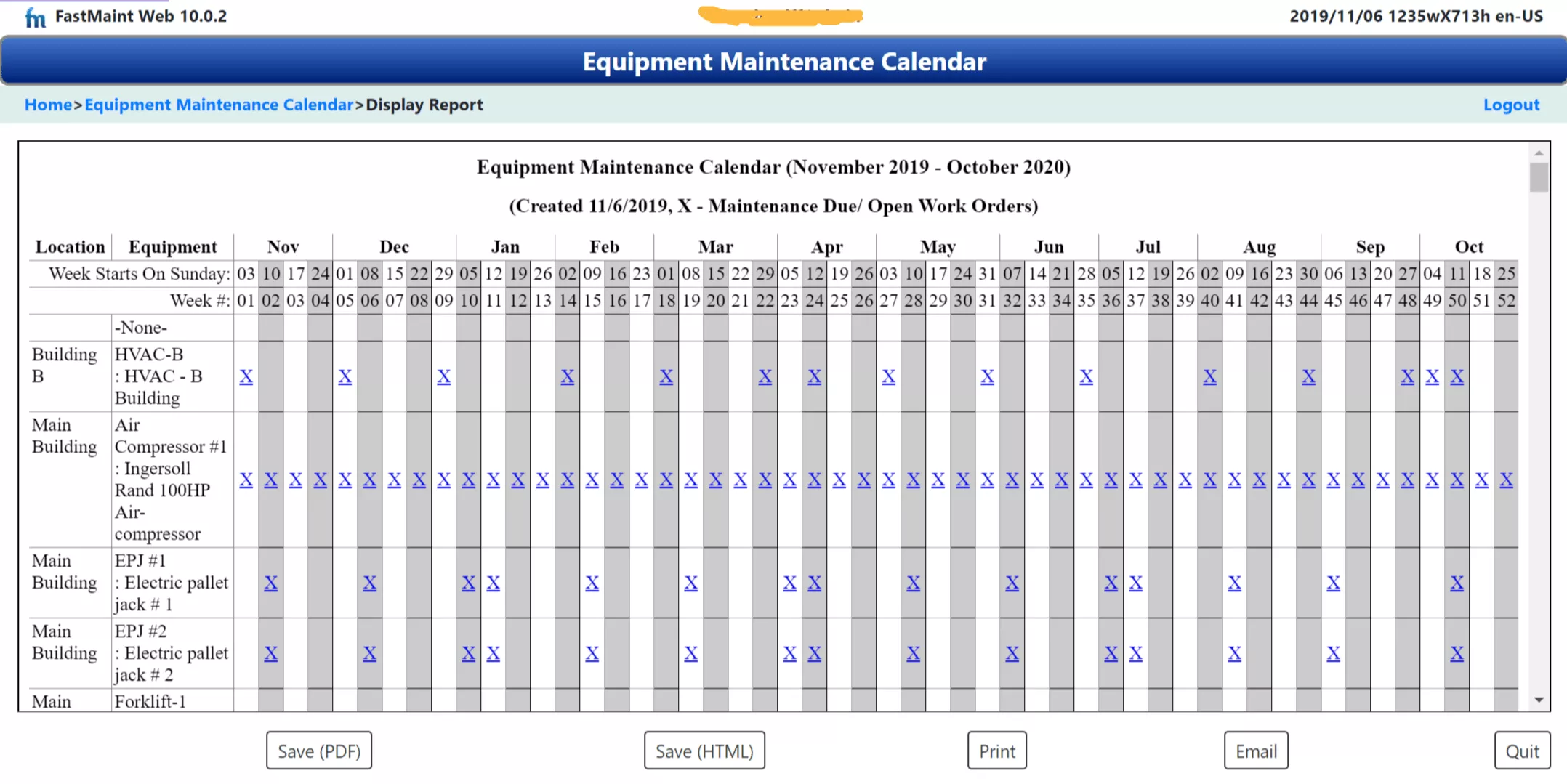
When you have a lot of equipment, this scheduling becomes complicated. Several strategies help: use equipment hierarchies to group related assets, combine work orders for tasks on the same equipment or in the same area, and outsource specialized work that would otherwise bottleneck your internal team during the shutdown window.
Using a Maintenance Calendar to Spot Problems
A maintenance calendar isn’t just for scheduling. It’s also a diagnostic tool. Here’s what to look for when reviewing your calendar view.
Workload Imbalance
Are certain weeks overloaded while others are nearly empty? This happens when tasks aren’t staggered properly, or when all PM was originally set to the same starting date. The fix is to adjust due dates to distribute work more evenly. Your technicians should have a roughly consistent workload week to week.
Schedule Conflicts with Operations
Does PM on critical equipment overlap with peak production periods? Share your maintenance calendar with operations so they can flag conflicts in advance. In FastMaint, the calendar report can be shared or printed for coordination meetings. This visibility is what transforms the maintenance-operations relationship from adversarial (“you can’t take that machine”) to collaborative (“let’s find a window that works for both of us”). See our article on using maintenance calendars effectively.
PM Compliance Gaps
Compare your calendar (what was scheduled) against your completed work orders (what actually got done). The difference is your PM compliance gap. A PM compliance rate below 90% means scheduled maintenance is being systematically skipped, and each skipped task is a future breakdown in the making.
5 Reasons PM Schedules Fail (and How to Fix Them)
1. Reactive Work Constantly Preempts Scheduled PM
This is the most common and most destructive failure. When breakdowns consume your team’s time, PM gets deferred, which causes more breakdowns, which consume more time. Breaking this cycle requires management commitment to protect PM time. Track your Planned Maintenance Percentage (target: 80%+) and treat it as a leadership KPI, not just a maintenance metric.
2. Schedules Built on Guesswork, Not Data
If PM frequencies are based on “it seems about right” rather than manufacturer specs and failure history, some equipment gets over-maintained (wasting labor) and some gets under-maintained (leading to failures). Start with OEM recommendations, then adjust based on actual performance data from your CMMS.
3. Workload Not Balanced Across the Calendar
Cramming 60 hours of PM into a week where your team has 40 hours of capacity guarantees deferrals. Use the calendar view to balance the load visually, and be honest about your team’s actual available hours after reactive work.
4. No System to Track Compliance and Flag Overdue Tasks
Paper calendars and spreadsheets can’t send reminders, escalate overdue tasks, or generate compliance reports. When a PM task slips, nobody notices until the equipment fails. CMMS software solves this with automated alerts and overdue tracking.
5. Failure to Update the Schedule as Conditions Change
Equipment ages. New assets are installed. Operating conditions change. A PM schedule that was right two years ago may be wrong today. Review quarterly and update based on work order data, technician feedback, and any changes to your asset base. Our 5-step maintenance management audit provides a framework for this review.
Is Your PM Schedule Actually Working? Track These Metrics.
PM compliance, Planned Maintenance Percentage, wrench time, backlog health: the same metrics displayed on the FastMaint CMMS dashboard. Simple to collect, not complicated to calculate, and they give you an honest read on schedule health.
How CMMS Software Automates Your PM Schedule
Everything above (building the schedule, generating work orders, balancing the calendar, tracking compliance) can be done manually. But past a handful of assets, manual processes break down. Tasks get forgotten. Calendars go stale. Compliance tracking becomes a full-time job in itself.
CMMS software automates the critical handoffs where manual processes fail:
Auto-generated work orders: When a PM task comes due (by date or meter reading), the CMMS creates a work order automatically, complete with task description, procedures, parts list, and assigned technician. No human needs to remember to create it.
Maintenance calendar reports: The CMMS generates forward-looking calendar views from your PM data, showing everything due across all equipment for any time period. In FastMaint, this is the Equipment Maintenance Calendar report that makes shutdown planning practical.
Availability checking: Before scheduling, the CMMS can verify that required technicians and parts are available, catching conflicts before they cause delays. FastMaint’s Work Order Planning Report includes this check automatically.
Compliance tracking: The system tracks which PM tasks were completed on time, which are overdue, and which were skipped. This data feeds your PM compliance KPI and provides evidence for audits.
Historical data for refinement: Every completed work order creates data you can use to refine your estimates and frequencies. Planned 2 hours but it consistently takes 3? The CMMS data shows you. Explore maintenance software reports that make this visible.
Organizations using CMMS-driven PM programs report 20–30% reductions in maintenance costs and significant improvements in equipment uptime. See our CMMS benefits case study for a real-world example with dollar figures. Try FastMaint free for 30 days →
Ready to Build a PM Schedule That Actually Works?
FastMaint CMMS gives you auto-generated PM work orders, maintenance calendar reports, availability checking, compliance tracking, and the data you need to improve continuously.
Frequently Asked Questions
What is a preventive maintenance schedule?
A preventive maintenance schedule is a planned calendar of maintenance tasks organized by asset, frequency, and assigned personnel, designed to be done before equipment fails. It specifies what needs to be maintained, how often, by whom, and with what resources.
What is the difference between a fixed and floating PM schedule?
Fixed schedules trigger on predetermined calendar dates regardless of when the last task was completed. Floating schedules calculate the next due date from when the previous task was actually done. Fixed is best for compliance. Floating is best for usage-driven equipment. Most operations need both.
How do I create a preventive maintenance schedule from scratch?
Six steps: (1) List assets and rank by criticality. (2) Identify tasks using OEM manuals, failure history, and technician knowledge. (3) Set frequencies. (4) Estimate labor, parts, and tools. (5) Map to a calendar and balance workload. (6) Load into CMMS to automate work order generation. Try FastMaint free →
What should a PM schedule include?
Asset identifier, task description, frequency, assigned technician, estimated time, required parts and tools, safety requirements, priority level, last completed date, and next due date. CMMS software auto-populates most of these from your PM templates.
How does a maintenance calendar differ from a PM schedule?
The PM schedule is the master database of tasks and frequencies. The maintenance calendar is the visual, time-based view showing which tasks fall on which dates. The calendar makes workload imbalances, conflicts, and shutdown planning opportunities visible at a glance.
How do I plan PM around shutdown periods?
Use your maintenance calendar to look several months ahead, identify which PM tasks fall near a planned shutdown, and adjust frequencies to cluster tasks within that window. CMMS software makes this practical by providing the forward calendar view and letting you adjust due dates easily.
How often should I review my PM schedule?
Quarterly, with a comprehensive annual review. Update whenever equipment conditions change, new assets are installed, or failure patterns suggest frequency adjustments. Use CMMS work order data to compare planned vs. actual and adjust accordingly. Get the free metrics guide →
Why do PM schedules fail?
Five common reasons: reactive work preempting PM, frequencies based on guesswork, workload not balanced across the calendar, no system for tracking compliance, and failure to update as conditions change. CMMS software addresses most of these through automation, alerts, and data-driven refinement.
Track Whether Your PM Schedule Is Actually Reducing Downtime
PM compliance, wrench time, backlog health: the metrics that tell you the truth about your maintenance program. Simple, practical, and used by FastMaint customers on their dashboard every day.
Related Reading
- Easy Ways to Create an Equipment Maintenance Schedule
- How to Schedule Preventive Maintenance Work Orders
- 7 Tips to Plan Equipment Preventive Maintenance
- Maintenance Planning: 7 Best Practices
- 7 Breakdown Maintenance Planning Tips
- Maintenance Spare Parts Management: 10 Proven Strategies
- Equipment Maintenance Workflow: Complete Guide
- How to Manage Maintenance Backlog
- 5-Step Maintenance Management Program Audit
- Planned Preventive Maintenance (PPM)
- 3 Quick Maintenance Metrics for Planners
- FastMaint CMMS Benefits & ROI Case Study
Note: Performance benchmarks cited in this article (PM compliance targets, PMP targets, cost reduction percentages) are drawn from widely published maintenance industry research including SMRP standards. Actual results vary by industry, facility size, and maintenance maturity.
Essential Maintenance Metrics Every Planner Needs to Know
Get Free Guide
