



Download Free CMMS Software Trial For Windows Computers

FastMaint CMMS for Equipment Maintenance Management

Fast setup in minutes. Easy to use. Install on-site. One-time fee. Schedule preventive & unplanned maintenance.

See Download FAQ below. No credit card needed!

Join hundreds of satisfied customers worldwide — just like the ones below!
hotel maintenance software client
Beverage & food manufacturing maintenance software client
maintenance software for food manufacturing
I have been thoroughly satisfied with FastMaint, it continues to meet our needs. We are now using it at two facilities. It is simple to install and use and we have been pleased with the customer support and updates received over the years. We’ve been using it around a decade at (my) site.
Frank Seipel
Vertex Energy
Some very good nifty features. I have used Maximo and EAM and this definitely holds up. The “work request” feature is amazing.
Farshid R
Maintenance Supervisor, Mechanical/ Industrial Engineering (Fortune 500 Company)
Easy to use and expandable, easy to print out work orders. Also easy to change any work orders. Simple to customize.
David S
Manager, Food Production

Try FastMaint Today! What You Get With The Trial

Equipment maintenance software
Preventive Maintenance

Scheduling & monitoring

tools.webp
Breakdown Maintenance

Reduce equipment downtime

seeding.webp
Powerful Reports

Flexible, customizable reports

General equipment maintenance
Inventory Management

Track & buy parts, supplies

under-maintenance-2.webp
Asset History

Know what was done & when

Building & facility maintenance software
Work Requests

Manage service requests

Download FAQ

  • How easy is it to download & install the trial? Very easy! If you’re using a Windows computer, you can download and install FastMaint Standard or Professional in just minutes — no admin access required. You’ll be up and running fast!
  • What happens at the end of the free 30-day trial? No pressure, no hassle. If FastMaint isn’t right for you, simply uninstall it using Windows’ Add/Remove Programs feature. If you love it (and most users do), you can purchase a license key anytime. Just enter it to unlock the full version — all your trial data stays intact.
  • How easy is it to use FastMaint? Our customers tell us they love FastMaint’s simplicity and reliability. Built-in tooltips, helpful on-screen guides, and a “Learn” section make it easy to master tasks like preventive and breakdown maintenance, work order feedback, and generating useful reports.

Have a few minutes? Download Free TrialJust give us your name & email to send the download link!

FastMaint CMMS: Your Computerized Maintenance Management System

Perfect for Streamlining Maintenance in Industrial & Commercial Installations

Empower managers to create effective breakdown and preventive plans with ease. Use checklists for equipment to stay organized and efficient.

Easily monitor repair expenses by equipment or location – get clear insights into material and labor expenses.

Choose from stand-alone, networked, or cloud editions to fit your needs.

Perfect for manufacturing plants, office buildings, hotels, resorts, power plants, water treatment plants, and more!

Effortless Service Planning for Maximum Efficiency

FastMaint CMMS is a maintenance management software solution with an intuitive, all-in-one interface.

💡 Unplanned Maintenance: Quickly plan for repairs from a task library when equipment malfunctions.
💡 Preventative Maintenance: Create a library of predefined jobs for seamless scheduling of planned upkeep.
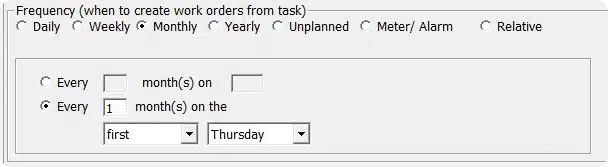
💡 Flexible Planning Options: Plan work by time intervals (e.g., every 4 months), meter readings (e.g., every 250 units produced), alarms, job completions, and more.

FastMaint puts you in control, ensuring efficient and reliable maintenance operations.

schedule preventive maintenance with FastMaint CMMS

Example: Set up a monthly service

Never Lose a Work Order Again—Stay Organized and On Track

FastMaint makes sure that your maintenance work orders are always organized and on track.

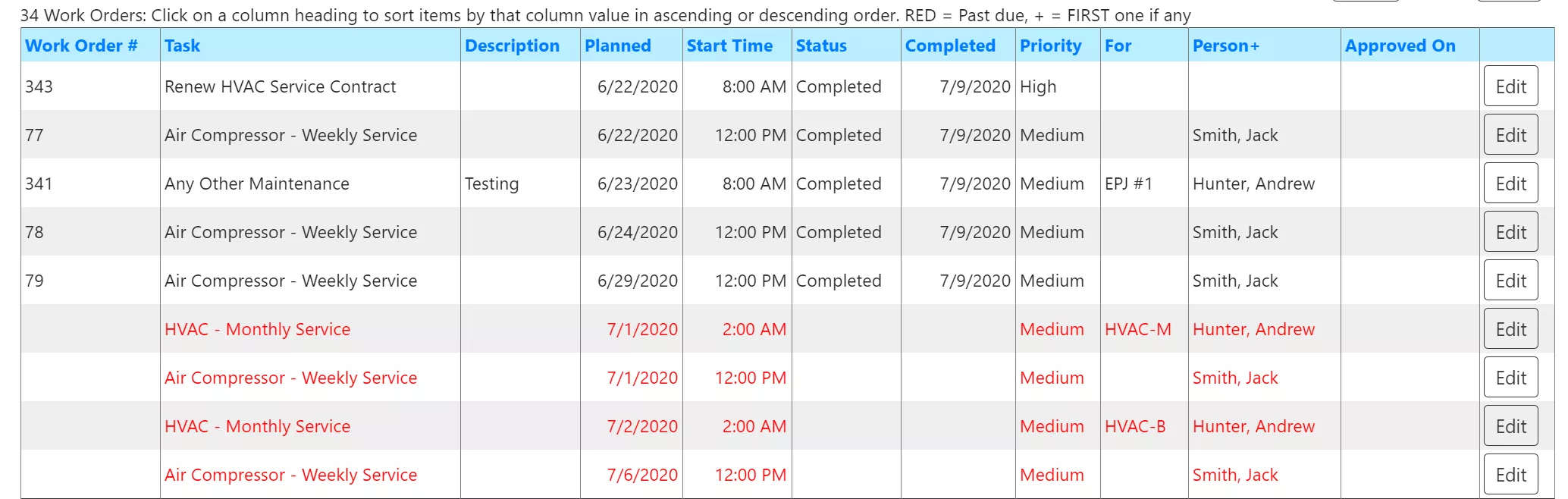
Work orders are automatically generated from scheduled task templates and can be sent directly to technicians or subcontractors.

Easily print or email work orders and send reminders for overdue jobs.

Reduce errors by including detailed instructions and images directly on the work orders, ensuring flawless execution every time.

list of maintenance work orders in FastMaint CMMS

Repair work orders with status

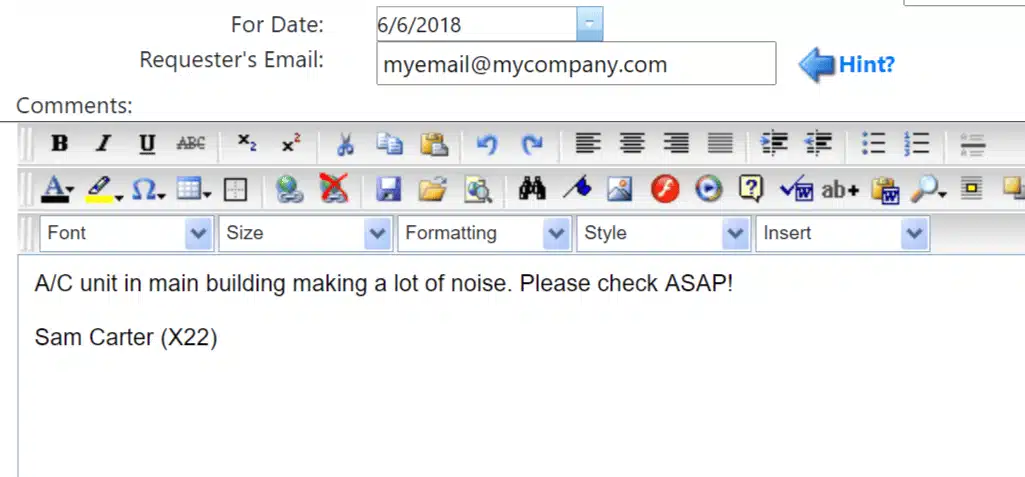
Sample repair work ticket

Make Sure No Maintenance Request Gets Overlooked - Stay on Top of Every Task

Machine operators or other departments can easily submit work tickets to the maintenance scheduler—no setup required.

Tickets can be sent via email, making it simple for requesters to stay connected. Plus, they’ll receive real-time updates on the status.

Maintenance schedulers can review, create work orders, or cancel tickets with ease, assuring nothing falls through the cracks.

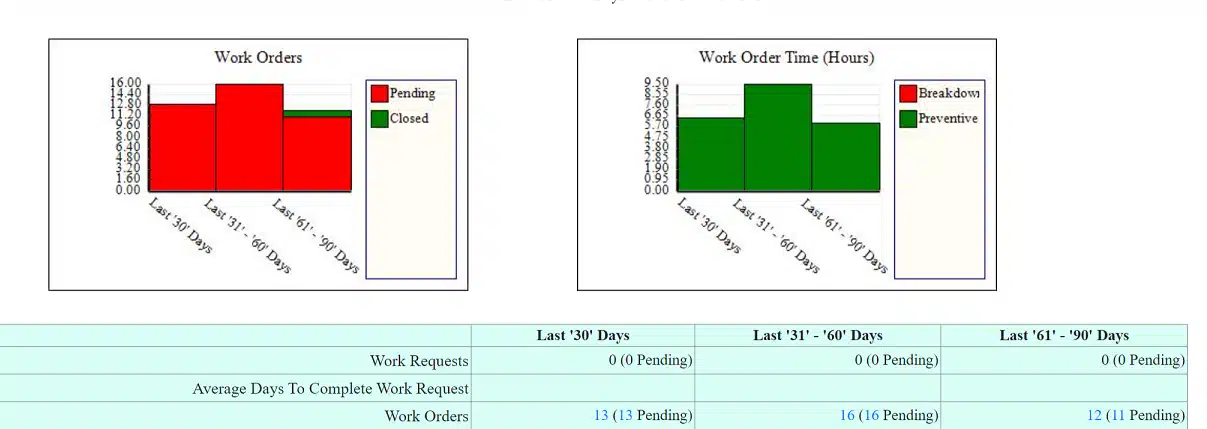
Statistics report showing maintenance performance over time

Powerful Analytics & Customizable Reports

FastMaint offers a variety of reports you can print or email, covering key areas like repair costs, spare parts usage, equipment downtime, and more. This makes it easy to analyze performance. Reduce time & money spent on repairs for better business profitability.

The one-page Statistics report gives you a quick snapshot of your performance over time.

Customize reports to fit your needs using the WYSIWYG Report Editor – add custom fields, logos, graphs, and more to tailor the insights you receive.

Start Fast - Easily Import Your Information and Get Up and Running in No Time

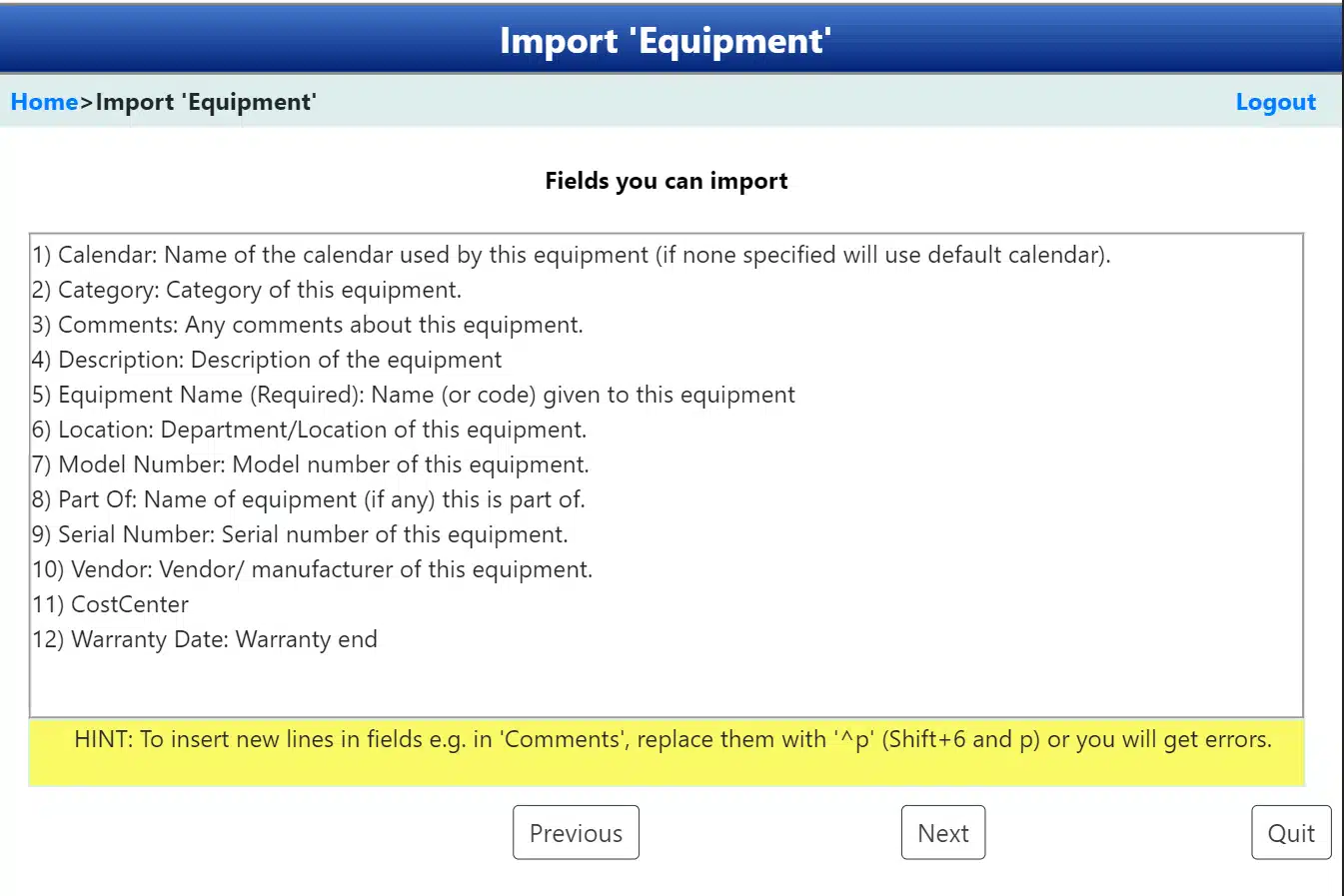
Already have information in Excel or similar files? Quickly import equipment details, spare parts, job instructions, and more to accelerate setup. Do this even with the trial/ demo of the maintenance management system.

Use the intuitive step-by-step wizard to map your data seamlessly. Made a mistake? No problem – you can easily re-import with corrections.

Plus, export items like work orders to Excel for deeper analysis and insights.

Importing equipment from a Microsoft Excel file

Need help selecting the right CMMS software for your company, and not sure where to start?

Free CMMS Software Selection Guide