
Essential Maintenance Metrics Every Planner Needs to Know
Get Free Guide
Maintenance Planning: 7 Best Practices That Cut Downtime by 30% [Free Guide]
Key Maintenance Metrics for Maintenance Planners
The same metrics FastMaint customers track on their dashboard to measure maintenance plan health. We picked them because they’re simple to collect, easy to calculate, and quickly show whether your plans are actually reducing downtime.
Key Takeaways
- Maintenance planning determines the “what” and “how” of maintenance: which assets need work and what resources are required. Scheduling determines the “when” and “who.”
- Facilities with structured maintenance planning achieve Planned Maintenance Percentages above 80% and technician wrench time of 55%+ (vs. 25–35% in reactive organizations).
- The 7 best practices below cover asset inventory, criticality-based prioritization, CMMS integration, standardized procedures, refined estimates, planner training, and continuous improvement.
- A simple health check using your work order data reveals whether your current plans are realistic and balanced — details in section 9.
Maintenance planning is the process of identifying which assets need maintenance, determining the type of work required, and estimating the labor, parts, tools, and procedures needed to complete the job. The goal is to make sure every maintenance task is properly prepared before it’s scheduled, so technicians arrive at each job with everything they need. That cuts wasted trips, idle time, and incomplete work.
Table of Contents
- Maintenance Planning vs. Scheduling: What’s the Difference?
- Best Practice #1: Maintain Clean, Up-to-Date Asset Records
- Best Practice #2: Prioritize Assets Using Criticality Analysis
- Best Practice #3: Centralize Planning with CMMS Software
- Best Practice #4: Standardize Work with Templates and SOPs
- Best Practice #5: Refine Estimates Using Historical Data
- Best Practice #6: Train a Dedicated Maintenance Planner
- Best Practice #7: Document Everything for Continuous Improvement
- How to Check the Health of Your Maintenance Plans
- Frequently Asked Questions
Maintenance Planning vs. Scheduling: What’s the Difference?
These terms get used interchangeably, but they’re distinct functions that work together.
Maintenance planning answers the “what” and “how”: which assets need work, what type of work is needed, what parts/tools/labor are required, what safety procedures apply, and how long the job should take. Planning is preparation: getting everything ready so the job can be done efficiently.
Maintenance scheduling answers the “when” and “who”: what date and time the work will happen, which technician is assigned, and how it fits with the production schedule and other pending work. Scheduling is execution timing.
Think of it this way: planning writes the recipe and gathers the ingredients. Scheduling sets the oven timer. Both are essential. A perfect plan that never gets scheduled never gets done. A schedule without a plan sends technicians to jobs without the parts, tools, or information they need. The result is wasted trips, incomplete work, and frustrated teams.
In smaller operations, one person handles both functions. In larger organizations, maintenance planners and schedulers are separate roles. Either way, the principles below apply.
CMMS Software Selection Guide
Not sure which CMMS features matter most for your planning needs? This guide provides a structured checklist to evaluate products and find the right fit for your team size and budget.
Best Practice #1: Maintain Clean, Up-to-Date Asset Records
Everything in maintenance planning starts with knowing what you have. An organized asset inventory keeps your plans based on accurate, current data, which you need for prioritizing tasks, allocating resources, and forecasting parts.
Start by conducting a full audit of all equipment and assets. For each item, record its specifications, current condition, location, criticality, and maintenance history. Remove obsolete records for equipment that’s been retired or replaced. If you’re pressed for time, focus on your most critical assets first and expand from there.
Your asset inventory should be maintained in your CMMS software, not in spreadsheets. Spreadsheets go stale the moment they’re created. A CMMS keeps records updated in real time as work orders are completed, parts are used, and equipment status changes. In FastMaint CMMS, you can import existing asset data from CSV files, making the initial setup straightforward.
Best Practice #2: Prioritize Assets Using Criticality Analysis
Not all assets deserve the same planning attention. A breakdown in your main production line has a very different business impact than a failure in a secondary office printer. Criticality-based prioritization ensures your planning effort and resources go where the impact is greatest.
Organize your assets into categories based on the consequences of failure. A simple High / Medium / Low framework works for most operations. For each asset, evaluate the potential impact on safety, production/operations, regulatory compliance, and repair cost. High-criticality assets get detailed job plans, tighter PM intervals, and dedicated safety stock for spare parts. Low-criticality assets can use simpler plans and longer intervals.
This classification also drives your spare parts strategy: critical assets should have key parts stocked on-site, while non-critical assets can use just-in-time ordering.
See How FastMaint Makes Maintenance Planning Simple
Import your equipment list, set up PM schedules, and generate your first work orders, all in the first week. Used by maintenance teams from one-person shops to 5000+ asset facilities.
Best Practice #3: Centralize Planning with CMMS Software
Maintenance planning without CMMS software is like project management without a project management tool: possible, but increasingly impractical as your operation grows. A CMMS centralizes your asset data, work order history, parts inventory, templates, and SOPs in one system, giving planners everything they need to prepare jobs efficiently.
The specific advantages for planners include: automated PM work order generation from schedules (so PMs don’t get forgotten), historical work order data for refining time and parts estimates, real-time parts availability checking before scheduling, technician workload visibility for balanced assignments, and reporting that shows whether plans are actually working.
Industry data consistently shows that organizations using CMMS achieve 20–30% reductions in maintenance costs and significant improvements in PM compliance. The software doesn’t just support planning. It creates the feedback loop that makes planning better over time.
In FastMaint, standardized maintenance jobs become templates that generate prefilled work orders, complete with instructions, parts lists, and time estimates. This alone saves planners hours per week and ensures consistency across the department. See real customer results →
Best Practice #4: Standardize Work with Templates and SOPs
Technicians should never arrive at a job wondering what to do, what tools to bring, or what safety procedures apply. Standardized work orders and Standard Operating Procedures (SOPs) ensure that every job of a given type is planned the same way, executed the same way, and documented the same way, regardless of which planner prepared it or which technician performs it.
For each recurring maintenance task, create a template that includes: a clear task description and scope, step-by-step procedures, required parts and quantities (linked to your parts inventory), required tools and special equipment, safety requirements and permits, estimated time, and any visual aids (diagrams, photos, manufacturer references).
Standardization also speeds up the planning process itself. When a planner can select a pre-built template instead of writing a job plan from scratch, they spend their time refining and improving plans rather than recreating them.
Best Practice #5: Refine Estimates Using Historical Data
Inaccurate time and resource estimates are the most common root cause of planning failures. If you estimate a job will take 2 hours and it consistently takes 4, every schedule built on that estimate will be wrong, creating downstream problems in workload, backlog, and PM compliance.
Use your CMMS work order history to compare planned versus actual times, parts consumption, and labor requirements. Over time, your estimates should converge with reality. Pay special attention to jobs that consistently take longer than planned. These often reveal hidden complexity, missing steps in the procedure, or parts delays. See our 5 tips for improving work order estimates.
The three categories to refine are: labor estimates (how many technicians, what skill levels, how many hours), materials forecasts (which parts, what quantities, from which suppliers), and tool/equipment allocation (what tools are needed, and are they actually available).
Are Your Estimates Improving? These Metrics Will Tell You.
The best practices above only work if you’re measuring results. This guide covers the specific metrics that FastMaint shows on its main dashboard. We picked them because they’re not too complicated to collect but give you an immediate, honest read on the health of your maintenance plans.
Best Practice #6: Train a Dedicated Maintenance Planner
The single most impactful organizational decision you can make for maintenance planning is separating the planner role from the execution crew. When planners are part of the maintenance team, they inevitably get pulled into today’s emergencies, which means tomorrow’s plans don’t get prepared, which creates more emergencies. It’s a cycle that perpetuates reactive maintenance.
A dedicated planner focuses on work that’s 2+ weeks out, creating detailed job plans and handing them to the scheduler (or supervisor) for the upcoming week. Once the plan is handed off, the planner moves to the next future project. Any issues during execution are handled by the supervisor and technicians. The planner stays focused on preparation.
A great maintenance planner combines technical knowledge (understanding the equipment and maintenance techniques), organizational skills (managing multiple plans, deadlines, and resources), and communication skills (coordinating with technicians, supervisors, and operations). Read more about the maintenance planner role and responsibilities.
Critically, the planner must know the CMMS inside and out — how to pull reports, access equipment history, check parts availability, use work order templates, and generate planning reports. This is where training on your specific CMMS pays for itself many times over.
Best Practice #7: Document Everything for Continuous Improvement
The difference between a maintenance department that stays reactive and one that improves over time is data. Every completed work order generates information that, if captured properly, makes the next plan better.
Create feedback mechanisms that capture: what the technician actually found (was the plan accurate?), how long the work actually took (was the estimate reasonable?), what parts were actually used (was the material list correct?), what unexpected issues arose (what should the plan include next time?), and any safety observations or near-misses.
Track key performance indicators monthly to measure your planning program’s health. The essential KPIs are: PM schedule compliance (target: 90%+), Planned Maintenance Percentage (target: 80%+), wrench time (target: 55%+), work order backlog (healthy: 2–4 weeks), and average days to complete work orders. See 3 quick maintenance metrics for planners.
Review and update your plans regularly based on this data. Maintenance planning isn’t a “set it and forget it” exercise. It’s a continuous improvement process. For a fuller review, see our 5-step maintenance management program audit.
How to Check the Health of Your Maintenance Plans
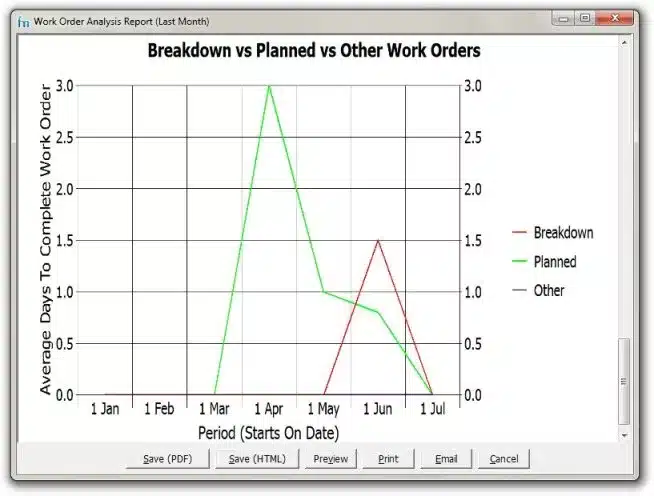
Different maintenance programs have different reporting tools, but the underlying diagnostic is the same. Track the average number of days your team needs to complete assigned work orders: the gap between the planned completion date and the actual completion date.
In FastMaint CMMS, the Work Order Analysis Report makes this straightforward. You’re looking for two warning signs:
Warning Sign #1: Consistently High Average Days to Complete
If your team regularly closes work orders past their due date, the problem often hides inside the plan itself. Check these three causes first. Tasks may take longer than estimated: compare planned vs. actual times and adjust. Scheduling conflicts: multiple tasks scheduled at the same time, or technicians unavailable. In FastMaint, the Availability Checking feature in the Work Order Planning Report flags these before you send out work orders. Spare parts not available: the same Availability Checking feature also identifies parts shortages in advance, so you can reorder before it delays the job.
Warning Sign #2: Highly Varying Average Completion Times
If the average time to complete work orders swings wildly from week to week or month to month, your maintenance plan may be unbalanced. Investigate these causes. Big tasks clustered in certain periods: distribute heavy PM tasks more evenly across the calendar. Skill mismatches: less experienced technicians need more time, so pair them with experienced colleagues or adjust estimates by skill level. Intermittent parts shortages: review work order feedback and talk to technicians to see whether parts delays are causing the variation.
Ready to Transform Your Maintenance Planning?
FastMaint CMMS gives maintenance planners the tools to build effective plans, track execution, and improve continuously: work order templates, PM scheduling, parts tracking, availability checking, and built-in reporting.
Frequently Asked Questions
What is maintenance planning?
Maintenance planning is the process of determining which assets need maintenance, what type of work is required, and what resources (labor, parts, tools, procedures) are needed to complete the job. It answers the “what” and “how” of maintenance. Effective planning ensures technicians arrive at every job prepared, increasing wrench time from a typical 25–35% to 55% or higher.
What is the difference between maintenance planning and scheduling?
Planning defines what work needs to be done and how (scope, parts, tools, safety, procedures). Scheduling determines when it will happen and who will do it (dates, technicians, coordination with production). Planning creates the blueprint; scheduling executes the timeline. Both are essential and should be tightly integrated.
What are the key principles of maintenance planning?
The seven key principles are: maintaining clean asset records, data-driven criticality-based prioritization, centralizing data with CMMS software, standardizing work with templates and SOPs, refining estimates using historical data, training a dedicated planner separated from the crew, and documenting everything for continuous improvement. Organizations following these principles achieve Planned Maintenance Percentages above 80%.
How do I know if my maintenance planning is working?
Track these metrics using your CMMS: average days to complete work orders (planned vs. actual), PM schedule compliance (target 90%+), Planned Maintenance Percentage (target 80%+), wrench time (target 55%+), and work order backlog (healthy: 2–4 weeks). Two warning signs: consistently high completion times (plans are unrealistic) and highly varying completion times (plans are unbalanced). Get the free metrics guide →
What does a maintenance planner do?
A maintenance planner identifies upcoming needs, creates detailed job plans, verifies parts availability, maintains work order templates and SOPs, analyzes data for improvements, and coordinates with scheduling. Effective planners work 2+ weeks ahead and are separated from the execution crew. Read about maintenance planner responsibilities in detail.
How does CMMS software help with maintenance planning?
CMMS centralizes all planning data in one system, automates PM work order generation, checks parts and technician availability, tracks work order status, and generates performance reports. Organizations using CMMS report 20–30% reductions in maintenance costs. Try FastMaint free for 30 days →
What KPIs should I track for maintenance planning?
Essential KPIs: PM Schedule Compliance (90%+), Planned Maintenance Percentage (80%+), Wrench Time (55%+), Work Order Backlog (2–4 weeks), Average Days to Complete Work Orders, Emergency Work Order Percentage (below 15%), and First-Time Fix Rate (85%+). Track monthly and use trends to drive improvements. Download the free metrics guide →
Track Your Maintenance Plan Health with the Right Metrics
Simple metrics, not complicated to collect, that give you an honest picture of whether your maintenance plans are reducing downtime, the same ones displayed on the FastMaint CMMS dashboard. One PDF with everything you need to start tracking today.
Related Reading
- Maintenance Planner: Role, Responsibilities & Skills
- How to Schedule Preventive Maintenance Work Orders
- 7 Tips to Plan Equipment Preventive Maintenance
- Easy Ways to Create an Equipment Maintenance Schedule
- Maintenance Spare Parts Management: 10 Proven Strategies
- Equipment Maintenance Workflow: Complete Guide
- How to Manage Maintenance Backlog
- 5 Tips for Maintenance Work Order Estimates
- 3 Quick Maintenance Metrics for Planners
- 5-Step Maintenance Management Program Audit
- CMMS Software Costs & Benefits Guide
- FastMaint CMMS Benefits & ROI Case Study
Note: Performance benchmarks cited in this article (wrench time targets, PM compliance rates, PMP targets, backlog ranges) are drawn from widely published maintenance industry research including SMRP (Society for Maintenance & Reliability Professionals) standards. Actual figures vary by industry, facility size, and maintenance maturity. Refer to ISO 55001 for asset management frameworks applicable to your operation.
Essential Maintenance Metrics Every Planner Needs to Know
Get Free Guide
