
Essential Maintenance Metrics Every Planner Needs to Know
Get Free Guide
The 5-Step Maintenance Management Program Audit
An annual maintenance audit is the fastest way to find where your program is leaking time and money. It also shows you where things are quietly working well. Here’s a practical, manager-ready process you can run in an afternoon, as long as your work-order data lives in one place.
Key takeaways
- An audit compares this year’s maintenance reality against what you intended to happen. That’s what surfaces problem equipment, weak PM coverage, and bad parts or suppliers.
- The core move is splitting every work order into unplanned vs. planned/preventive, then reviewing each group for different failure signals.
- Run it yearly to smooth out seasonal spikes; review quarterly for faster course-correction.
- The whole thing is only as easy as your data is accessible. That’s why teams running on spreadsheets rarely manage to do it at all.
Start here: the metrics your audit is built on
You can’t audit what you don’t measure. Our free Essential Maintenance Metrics guide lays out the exact numbers this audit relies on, the same metrics FastMaint puts on your dashboard. Grab it before Step 1 so you know what to pull.
Why Audit Your Maintenance Management Program?
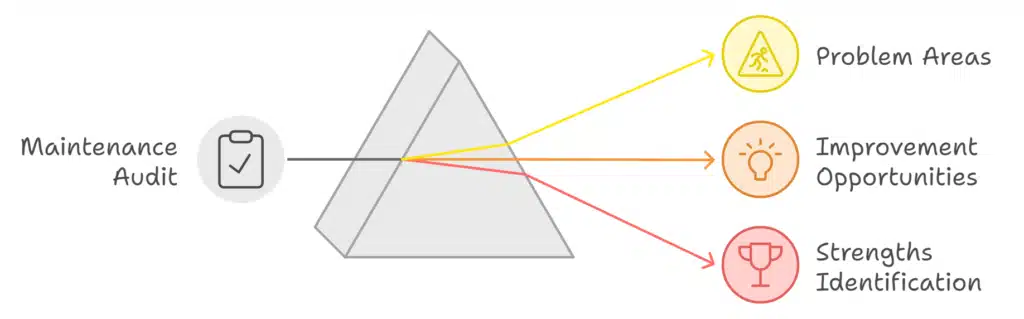
Did you review all of your maintenance activity for the past year? It sounds tedious. But a periodic audit pays for itself: it pinpoints problem areas, shows where there’s room to improve, and just as importantly, shows where your program is already doing well.
Maintenance operations drift over time. Equipment is added or retired, technicians come and go, suppliers change, and production demands shift. Each of those changes can quietly introduce new inefficiencies, or open up new opportunities. A regular audit is how you catch both before they show up as a breakdown.
What To Do In The Maintenance Management Program Audit
The audit boils down to gathering a year of work-order data, splitting it into two buckets, and asking pointed questions of each. Here’s the full process.
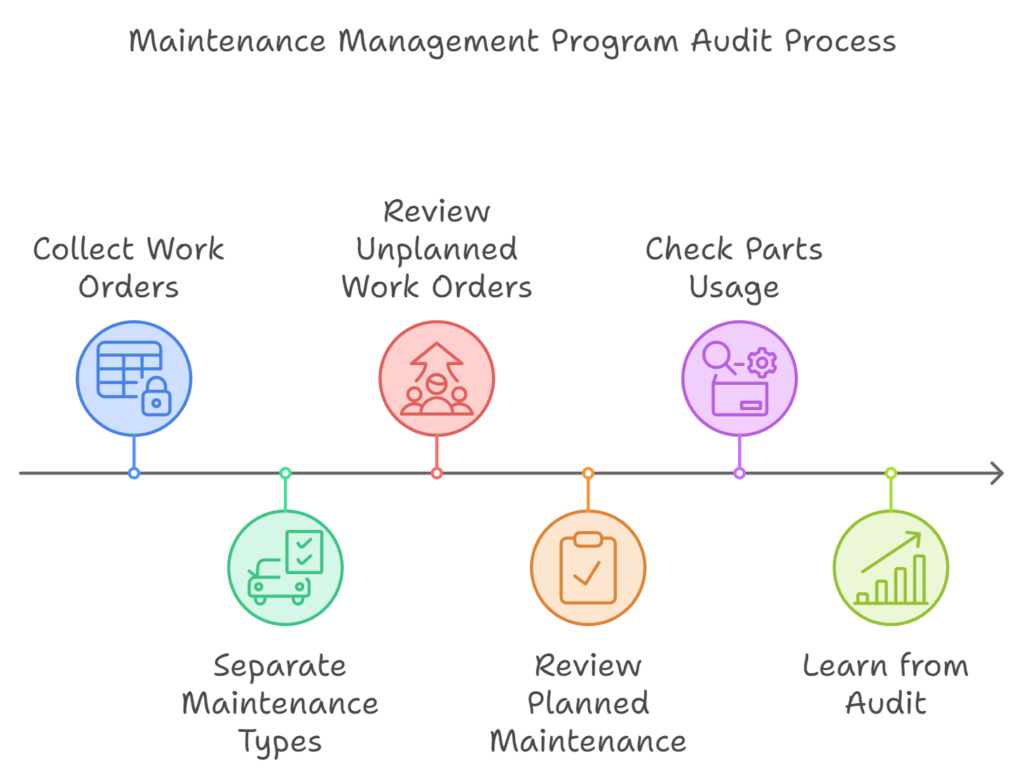
Collect every work order from the last year
If you run maintenance software, this is the easy part: pull analysis reports for the period, or export the relevant work orders for deeper analysis. With FastMaint CMMS, for example, you can export to a comma-delimited file and open it in Excel for custom charts and pivots. On spreadsheets alone, this step is where most audits stall.
Separate unplanned from planned/preventive maintenance
Sort every job into two buckets: (a) unplanned/breakdown maintenance and (b) planned/preventive maintenance. You’ll analyze each group differently, because each tells you something different about the health of your program.
Review unplanned work orders for problems
Look for equipment that fails often or eats a lot of unplanned hours. That’s a signal it may need replacing, or that PM isn’t being done right. Also watch for failures that cluster after a particular technician’s work (often a sign of skipped steps or missing training), work orders flagged as problems or running long, and recurring early failures that point to a bad parts batch or supplier.
Review planned/preventive work orders for problems
Find the equipment consuming the most PM time and money. Could newer equipment need less upkeep? Are cheaper alternatives available? And, critically, is some of your PM overkill? Check intervals against the manufacturer’s recommendations. Teams often over-service equipment out of habit, burning labor for no reliability gain.
Check your maintenance parts usage
Pull a year of parts-usage reports and hunt for bad batches or low-quality suppliers. A bad batch doesn’t just cost you the part. It also flags equipment that may need early re-maintenance, because it was serviced with faulty components. Spare parts are a big slice of most maintenance budgets, so dropping unreliable suppliers and tightening parts management saves money and reduces breakdowns.
Planned (preventive) maintenance: scheduled work done to keep equipment running and prevent failure. Unplanned (reactive) maintenance: work triggered by a breakdown or fault. A healthy program shifts work from the second bucket into the first over time.
Found gaps in your data while reading this?
If an audit feels hard because your records are scattered, that’s the real problem to fix. FastMaint keeps every work order, PM schedule, and parts record in one place, so next year’s audit is a few reports instead of a week of digging. Try it free for 30 days. No credit card required.
What “Good” Looks Like
Numbers only mean something with a reference point. These are widely cited rules of thumb to sense-check your audit against. Treat them as directional targets, not hard rules, since every operation differs.
What You Should Learn From The Audit
By the end, you should have a clear picture of your problem areas, your improvement opportunities, and where you’re already winning. That picture gets more valuable every time you repeat the exercise. Year over year, you can actually see whether you’re getting better.
Shorter quarterly or semi-annual reviews are useful for fast course-correction, but a yearly audit smooths out seasonal noise. Think of equipment running flat-out for holiday demand, or HVAC strain at the start of summer and winter. Those spikes make quarter-to-quarter comparisons misleading. An annual view evens them out.
Why Your CMMS Makes Or Breaks The Audit
Every step above depends on one thing: being able to pull a year of clean, complete data on demand. That’s exactly where a good CMMS earns its keep, and where spreadsheets and memory fall apart. If the data was never captured consistently, there’s nothing to audit.
FastMaint is built for small maintenance teams who need real preventive maintenance without a six-month rollout or a dedicated IT department. It’s complete enough to run a proper audit, and simple enough that your technicians actually log the work in the first place. That last part is really the whole point. Whether you run it as a cloud subscription or install and own it outright, the data is there when audit time comes.
One thing your audit will make obvious: it needs work orders, PM scheduling, parts tracking, and reporting, all together. With FastMaint most of that comes standard rather than split across tiers, so you’re not discovering mid-audit that the report you need sits behind an upgrade. As one long-time customer put it, “you weren’t paying for stuff you didn’t need.”
Two ways to get started
Take FastMaint for a spin with a free 30-day trial (no credit card), or download the CMMS Selection Guide if you’re still comparing options for your team.
Frequently Asked Questions
How often should I audit my maintenance management program?
Run a full audit once a year to smooth out seasonal demand swings. Lighter quarterly or semi-annual reviews are useful for catching issues sooner, but the annual audit is your benchmark for year-over-year comparison.
What data do I need to do a maintenance audit?
At minimum: a full year of work orders (planned and unplanned), labor hours per job, equipment/asset records, and parts-usage history. A CMMS gives you all of this as exportable reports; without one, you’re reconstructing it by hand.
Can I run an audit using just spreadsheets?
You can, if your records are complete and consistent. That’s the catch, though. Most spreadsheet-based teams have gaps in their history, which is exactly what stalls the audit at Step 1. A CMMS keeps the data structured, so the audit is a few reports rather than a reconstruction project.
What’s the single most useful output of an audit?
The split between planned and unplanned work, and how it’s trending. A program shifting work from reactive into preventive is improving. One drifting the other way needs attention, usually in PM scheduling or data capture.
Before you go: grab the metrics guide
The Essential Maintenance Metrics guide pairs well with your audit. These are the simple, useful numbers FastMaint puts on your dashboard so you can track progress year to year.
Related reading
Essential Maintenance Metrics Every Planner Needs to Know
Get Free Guide